How many times have you looked for the latest version of an instruction and found three different ones: one on the server, one in an e-mail, one printed on the wall? The certification auditor will take the one on the wall. If it does not match the one on the server, you have a nonconformity, even if the only change was the maintenance phone number.
In this post we show how the Documents module of the E-KAKOVOST platform manages documents: from upload to a history you export as a PDF in seconds at audit time.
What the standard asks of your documents
Clause 7.5 of ISO 9001 does not ask for a thick quality manual. It asks for documented information to be identified, reviewed and approved, available where people need it and protected from unintended change. When something changes, it has to be clear which version applies and who approved it.
On paper that is simple. In practice documents multiply in three places at once, approvals travel by e-mail, and acknowledgement is proven by a signature sheet that is always in a different folder. The Documents module turns those four requirements into four things that happen by themselves.
How a document lives in the Documents module
1. One valid version, a clear status
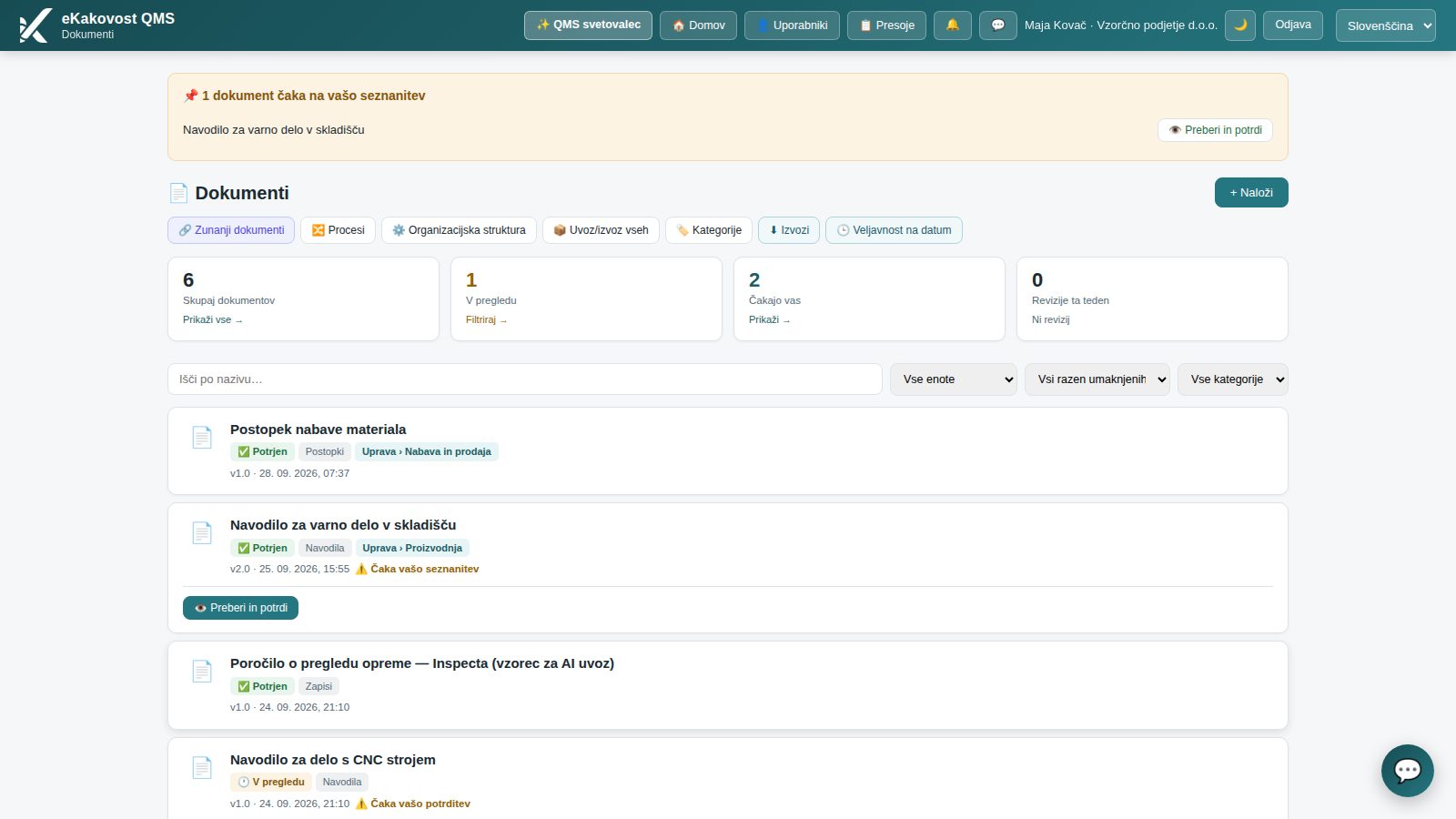
You upload the document (PDF, Word, Excel, image) and give it a category, a unit, an identifier (e.g. WI-CNC-07), an owner and the date of the next review. From then on it has one status: draft, under review, approved, rejected or withdrawn. The list shows everything at a glance, and the Waiting for you card shows exactly what needs your signature or acknowledgement, and nothing else.
The document list: every document has one status; the Waiting for you card counts only what is waiting for you.
While the author prepares a new version, employees keep seeing the valid one with the badge 🔄 Under revision. Nobody sees the draft except the author, the approver and the administrator. So nobody can work from a document that has not been approved yet.
2. Approval follows the organisational structure, not a list of e-mail addresses
You do not pick an approver for every document. By default it is the head of the unit the document belongs to, or the head of the parent unit. For two-stage routes (e.g. the quality manager, then management) you draw an approval process; a step can be bound to the head of a unit without a name, so when the head changes, the approver changes too and the process needs no editing.
Approval is a deliberate act: the approver has to open the version before approving it, can add a comment, and on rejection enters a reason the author receives. An approved document states who, when and how approved it: as the designated approver, with administrator rights in place of an absent approver, or automatically on the last acknowledgement, if you chose that activation mode.
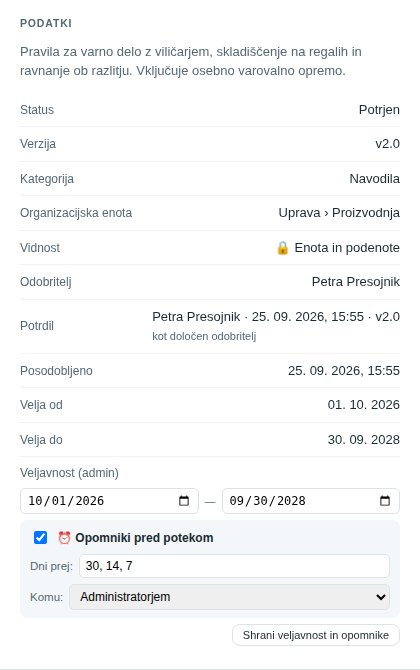 Every approved document records who approved it and in what way.
If your organisation requires an electronic signature, the approval is bound to the approver’s password (and MFA code) and to exactly that version of the file.
3. Acknowledgement with evidence instead of a signature sheet
For instructions and procedures the administrator requests acknowledgement, optionally with a deadline. The employee opens the document with Read and confirm, reads it and confirms Acknowledged in the preview. Acknowledgement is not possible without opening the document; the system records when it was opened and when it was confirmed.
In the acknowledgement report the administrator sees who confirmed and when, who has not yet, and who is late. Late employees get a reminder, and the deadline also appears in the Planner. For key documents you can switch on a comprehension quiz: AI prepares three questions from the content and the employee has to answer at least two correctly.
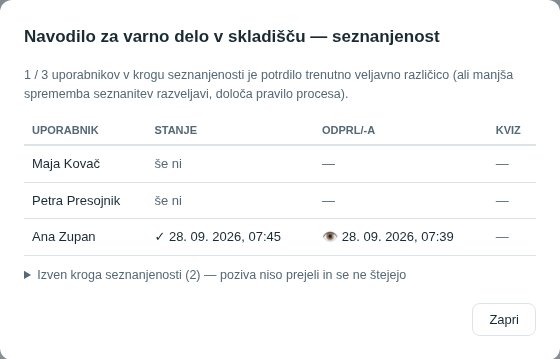 The acknowledgement report replaces the signature sheet: name, time opened, time confirmed.
4. A new version: minor or substantive
An approved document cannot be edited; you upload the change as a new version and describe what changed. A minor change (corrections, typos) goes 1.0 → 1.1, a substantive one (procedures, responsibilities) 1.1 → 2.0. A substantive change goes for re-approval and requires everyone to re-acknowledge; with a minor one the acknowledgements remain. If the organisation has AI switched on, it compares the new file with the current one and suggests the type of change; the decision is yours.
Anyone who may not edit the document can propose a new version with text or a photo from a phone; the manager accepts the proposal as a new version or rejects it with a reason.
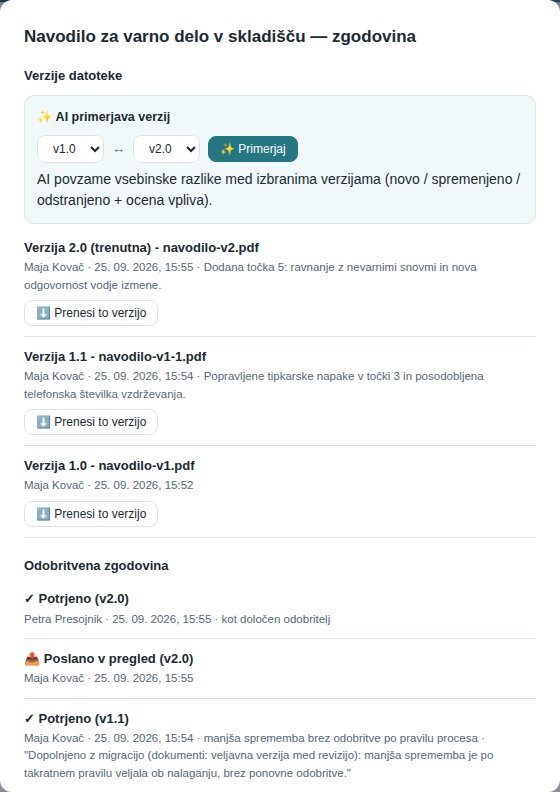 History: every version with its change description and every approval with a name and time. Any older version can be downloaded.
5. Review, reminders and a trail for the auditor
The next review date reminds the document owner 14 and 7 days ahead. When validity expires, it reminds whoever you specify. For the auditor the most important button is Document history (PDF): one printout with all versions, the approval log and the acknowledgement record, with version labels that match in every section. Instead of browsing folders, you show one document.
The Valid on date view answers the question auditors like to ask: which documents were valid on the day a nonconforming product was made.
What the quality manager gains
| Without a system | Documents module | |
|---|---|---|
| Valid version | Three copies in three places | One, with the status Approved; the previous one applies during revision |
| Approval | By e-mail, no trail | By organisational structure, with name, time and way of approval |
| Acknowledgement | Signature sheet | Read and confirm, with deadline, report and optional quiz |
| Change | New file, old name | New version with description, re-approval and re-acknowledgement when needed |
| Review | Whoever remembers | Owner and date, reminders, Planner |
| Audit | Searching folders | Document history as a PDF |
Who uses the module
- The quality manager, who makes sure one version applies and every approval can be proven.
- Heads of units as approvers of their unit’s documents, with no extra roles or settings.
- Employees, who see only valid documents on a phone or computer and acknowledge in two clicks.
- The auditor, who gets the document history in one PDF.
Book a free demonstration of the programme. In 30 minutes we show you how your procedures and instructions would live in the Documents module: from upload to the history for an audit, on an example from your industry. Choose a time →
If you do not have the standard yet, a tidy document system is the first thing an auditor checks. Slovenian companies can obtain a subsidy of up to 60 % for implementing ISO standards.
Frequently asked questions
What does ISO 9001 require for documents?
Clause 7.5 of ISO 9001 requires documented information to be identified, reviewed and approved, available where it is used, protected from unintended change, and controlled so that the valid version is clear. The standard does not prescribe a tool: a folder on a server is fine, if it really keeps those rules.
How do I know which version is valid in the Documents module?
Every document has exactly one valid version with the status Approved. While the author prepares a new version, employees keep seeing and downloading the valid one with the badge Under revision; the draft is visible only to the author, the approver and the administrator. All older versions stay in the history and can be downloaded.
Who approves a document?
The approver comes from the organisational structure: by default the head of the unit the document belongs to, or the head of the parent unit. For more complex routes you draw an approval process with several steps, and a step can be bound to the head of a unit instead of a named person. The approver has to open the version before approving it.
How do I prove that employees have read a document?
The administrator requests acknowledgement for the document, optionally with a deadline. The employee opens the document and clicks Acknowledged; the system records when it was opened and when it was confirmed. The acknowledgement report and the Document history (PDF) show who has acknowledged and who is late. Optionally the acknowledgement includes a short comprehension quiz.
What happens with a minor change to a document?
You mark the new version as minor (e.g. 1.0 → 1.1) or substantive (1.1 → 2.0). A substantive change goes for re-approval and requires everyone to re-acknowledge. A minor one goes for approval too by default, while acknowledgements remain; a process can adjust that rule. In every case the history records who approved which version.
Transparency: artificial-intelligence tools were used in preparing this article. The content was reviewed and approved by the author.