
The auditor picks up the calliper from the inspection bench and asks: “When was this calibrated, and where is the certificate?” If the answer is “somewhere in Ana’s folder”, it is not just that calliper that is in question. Every measurement you made with it since the last calibration is, and so is every product you released on the strength of those measurements.
In this post we show how the Equipment module of the E-KAKOVOST platform manages measuring and work equipment: from the register with a traffic light and calibrations with impact assessment to the maintenance plan, breakdowns that employees report from a phone, and the audit printout.
What the standard asks of your equipment
Clause 7.1.5 of ISO 9001 (monitoring and measuring resources) requires measuring equipment to be calibrated or verified at specified intervals, its status to be identifiable, the equipment to be protected from adjustment and damage, and, when an instrument is found unfit, the validity of previous results to be assessed and acted upon. Clause 7.1.3 (infrastructure) adds machines, lifting equipment and vehicles: maintenance has to be planned and provable.
The standard prescribes neither the interval nor the tool. It prescribes that you know which item is fine, which is not, and that you can prove it. In practice this often ends in a spreadsheet someone refreshes two weeks before the audit, and certificates in three different folders. The Equipment module turns those requirements into things that happen by themselves.
How equipment lives in the Equipment module
1. A register with a traffic light: what is valid, what is expiring, what slipped
You enter each item once: identifier (e.g. MO-002), name, classification (measuring equipment, work equipment, lifting equipment, vehicles or your own), location, custodian and check interval. For instruments you add the range and accuracy, for vehicles the registration plate and the registration and insurance expiry dates.
From then on every item has a colour: green is valid, amber expires within 30 days, red is overdue or failed its last check, grey is withdrawn. New equipment is red until you enter its first check: no evidence, no validity. The counters above the list tell you how many items are overdue, how many are expiring and how many are valid.
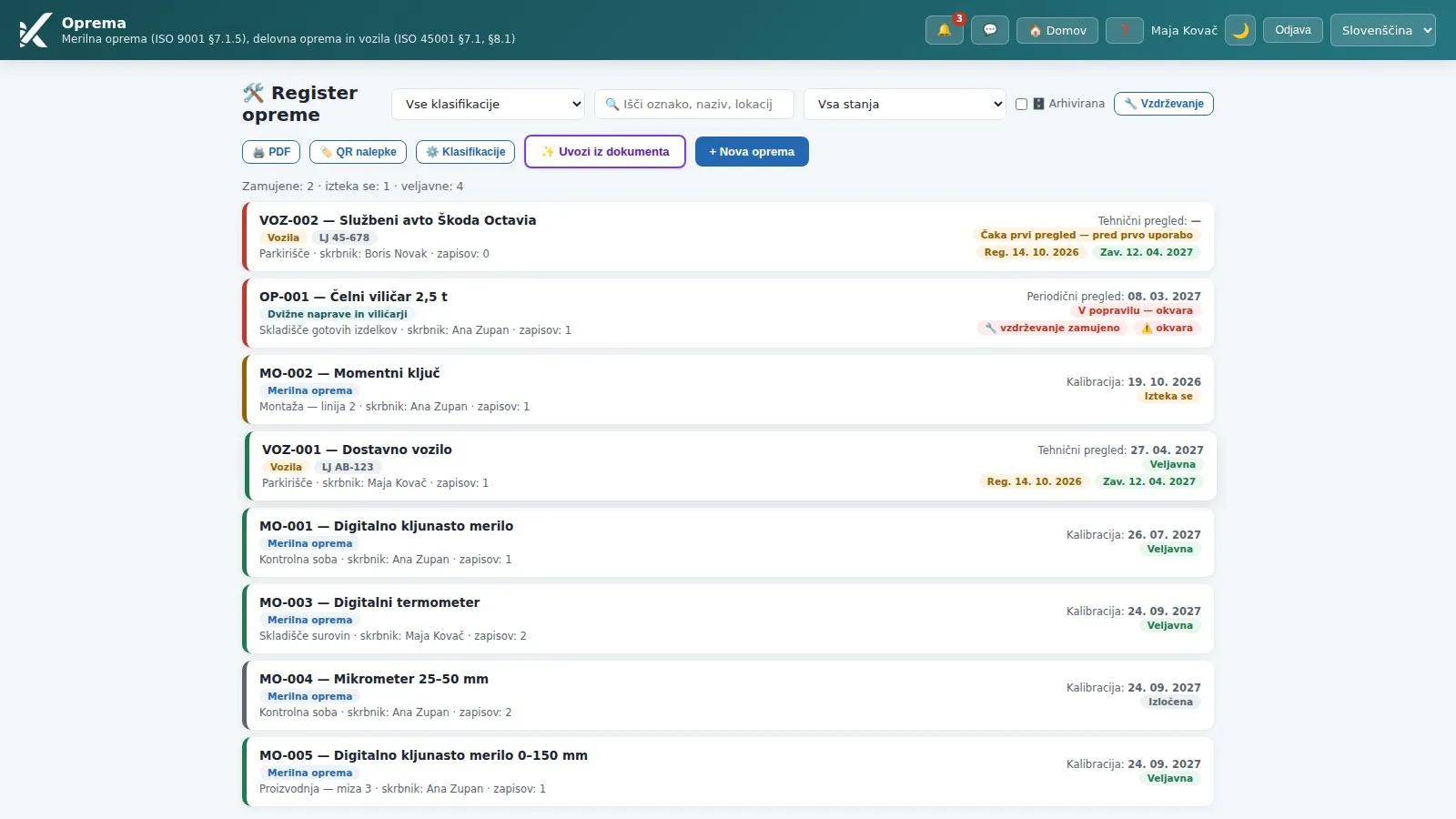 The equipment register: every item has a colour and a due date; forklift OP-001 also carries badges for overdue maintenance and an open breakdown.
The custodian gets a reminder 30 and 7 days before the due date, and daily once it is overdue, until the check is entered. If there is no custodian, the organisation’s administrators get it. The due date also appears in the Planner.
2. Calibration with evidence, and impact assessment when an instrument fails
You record a check with the date, the provider (optionally from the Suppliers register), the certificate number, the measurement uncertainty and the attached certificate. The system calculates the next due date, updates the traffic light and clears the reminders. Records are never deleted or edited: the check history is the evidence.
When an instrument does not conform, the module does not let it stay in use. You must choose the status Use prohibited or Withdrawn, and you must write the impact assessment: which measurements and batches may be affected, what you checked and what you did (re-measurement, holding the batch). That is exactly what clause 7.1.5.2 requires and the first thing an auditor asks. From the record you open a corrective action with the description already filled in, in one click.
If you have an inspection report from an authorised body covering 40 items of work equipment, you do not retype it. Import from document uses AI to read the PDF or scan, recognises items by serial number, proposes the date, result and deficiencies for each, and you check and confirm the rows. For a non-conforming item the impact assessment is mandatory here too.
3. A maintenance plan: several tasks, each with its own interval
Calibration confirms the equipment conforms. Maintenance keeps it that way. On every item you can run several maintenance tasks: the daily forklift check before use, chain lubrication every 30 days, a hydraulic oil change once a year. Each has an interval, a responsible person and a due date; completions are recorded with a click and stay as evidence (clause 7.1.3).
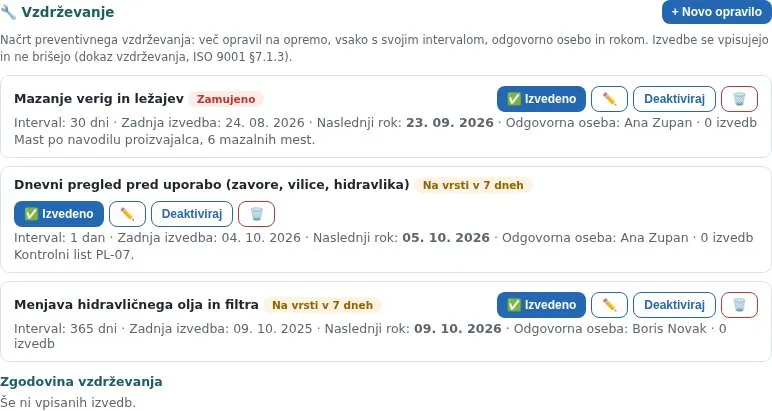 The forklift’s maintenance plan: three tasks, each with its own interval and responsible person; chain lubrication is overdue.
A task has its own colour (on schedule, due within 7 days, overdue), and in the register an item with an overdue task gets the badge 🔧 maintenance overdue. The responsible person gets a reminder on the due date, for longer intervals a week ahead as well, and daily once overdue together with the organisation’s administrators.
4. Breakdowns: reported from a phone, taken over, escalated, with repair evidence
When a machine stops, what matters most is that the right person knows immediately. Anyone can report a breakdown: describe what happened, mark that the equipment is down, and attach photos, video or documents straight from the phone. The equipment gets the status Under repair, downtime hours start running, and the custodian, the people responsible for maintenance and, on a stoppage, the quality manager get an e-mail with the attachments at once.
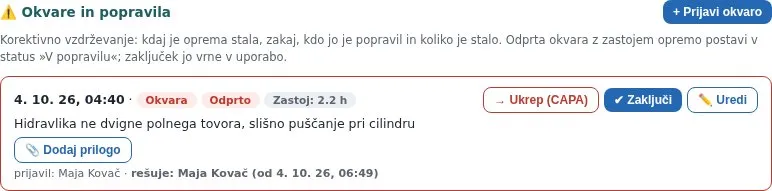 An open breakdown: downtime is running, it records who reported it and who is handling it; a corrective action opens from it in one click.
Whoever takes over the breakdown is recorded with name and time, so it cannot happen that everyone assumes someone else is on it. If a breakdown with a stoppage is not taken over within two hours, the system escalates to the quality manager and the administrators. On closing you enter the cause, the repair, the provider, the cost and repair evidence (a photo, a service sheet); the equipment returns to use, and the downtime and cost feed the indicators.
5. A QR label on the machine: breakdown reported in three taps
An employee on the shop floor is not going to open a computer to find the right item in the register. So every item has a QR code: the employee scans it with a phone, logs in and gets the breakdown form already opened for that machine, with the camera a thumb away.
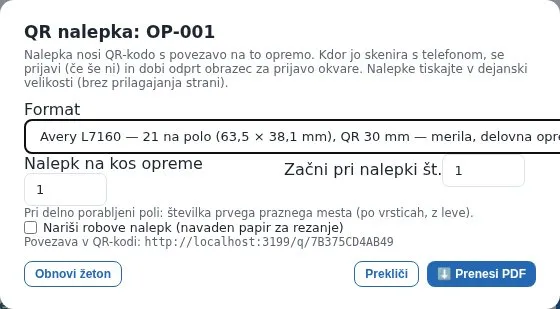 You print labels for one item or the whole register: an A4 poster, or Avery sheets of 4, 21 or 65 labels, always with the logo.
Labels print on standard Avery sheets (A6 for machines and vehicles, 63 × 38 mm for instruments and work equipment, mini 38 × 21 mm for hand tools) or as an A4 poster. If a label goes missing or the machine is sold, you renew the token and the old codes stop working.
6. An overview for the manager and a printout for the auditor
The Maintenance button above the register opens an overview of all equipment: active tasks (overdue first), open breakdowns and the indicators for the last 12 months, from the number of breakdowns and downtime hours to costs. Every item has buttons for a new task and a breakdown report.
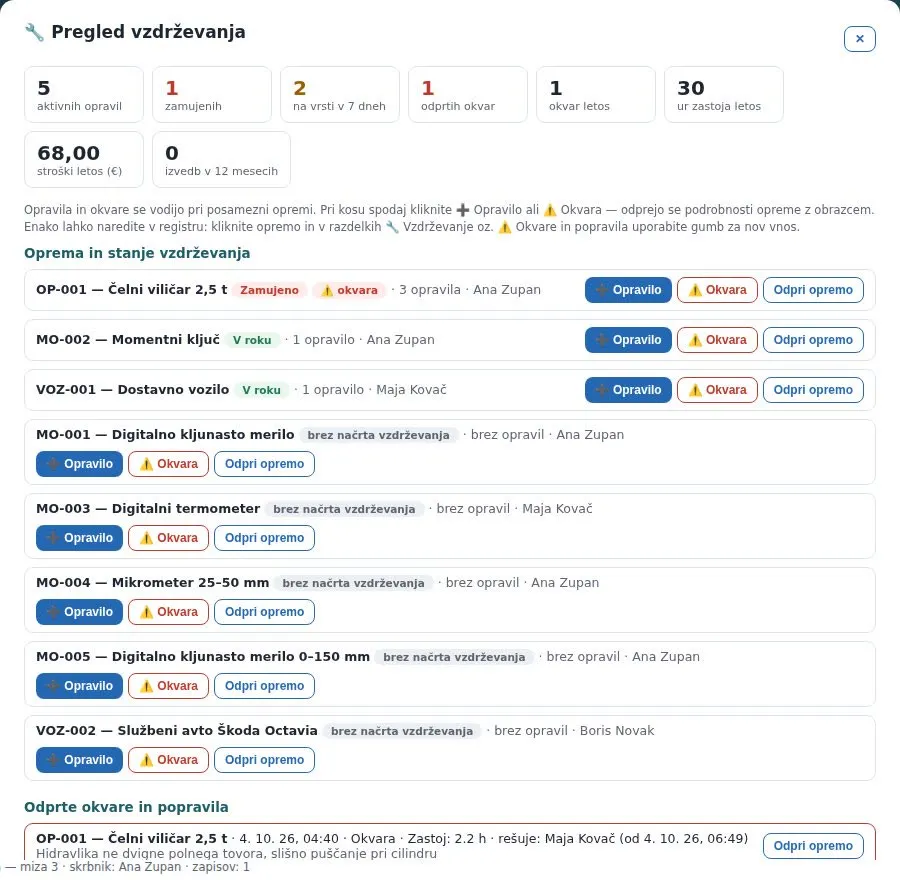 The maintenance overview: indicators on top, below them all equipment with its status and the quick buttons Task and Breakdown.
For the audit you click PDF: the equipment register with the organisation’s header, by classification, with the last check, the next due date and the status for every item, and optionally the maintenance plan and open breakdowns. Withdrawn equipment is in a separate section. The KPI dashboard shows the share of valid checks and the number of items expiring within 30 days.
What the quality manager gains
| Without a system | Equipment module | |
|---|---|---|
| Equipment status | A spreadsheet refreshed before the audit | A traffic light on every item, live counters |
| Calibration due date | Whoever remembers | Calculated from the last check, reminders 30 and 7 days ahead, Planner |
| Certificates | In three folders | On the check record, history never deleted |
| Failed instrument | Removed, nothing written down | Mandatory impact assessment, status, corrective action |
| Maintenance | Service booklet in a drawer | A plan with tasks, completions as evidence |
| Breakdown | A phone call that gets lost | Reported via QR code with attachments, take-over, escalation, cost |
| Audit | Searching folders | Equipment register as a PDF |
Who uses the module
- The quality manager, who always knows what is valid and what is overdue, and shows the auditor one printout.
- Equipment custodians and maintenance staff, who get a reminder before a date passes and a breakdown the moment it happens.
- Production employees, who report a breakdown from a phone via the QR code, with a photo and no computer.
- The auditor, who gets the register, the check history with certificates and the impact assessments in one place.
Book a free consultation. In 30 minutes we show you how your instruments, machines and vehicles would live in the Equipment module: from the register to the audit printout, on an example from your industry. Choose a time →
If you do not have the standard yet, a tidy register of measuring equipment is one of the first things an auditor checks on the shop floor. Slovenian companies can obtain a subsidy of up to 60 % for implementing ISO standards.
Frequently asked questions
What does ISO 9001 require for measuring equipment?
Clause 7.1.5 of ISO 9001 requires measuring equipment to be calibrated or verified at specified intervals (or before use), its status to be identifiable, the equipment to be protected from adjustment and damage, and, when an instrument is found unfit, the validity of previous results to be assessed and acted upon. Work equipment and vehicles fall under clause 7.1.3 (infrastructure): maintenance has to be planned and provable.
How long should the calibration interval be?
The standard does not prescribe it. Set it from the manufacturer's recommendation, how often the instrument is used, how demanding the measurements are and what previous calibrations showed. In the Equipment module you enter the interval on the classification (e.g. Calibration, 365 days) or on the item; the system calculates the next due date from the last check and reminds the custodian 30 and 7 days ahead.
What do I do when an instrument fails calibration?
It must not stay in use, and every measurement since the last successful check is in question (ISO 9001, clause 7.1.5.2). In the module a Does not conform result requires an impact assessment: which measurements or batches may be affected, what you checked and what you did. The equipment gets the status Use prohibited or Withdrawn, and a corrective action opens from the record with one click.
How does maintenance differ from calibration?
A calibration or inspection confirms that the equipment conforms (certificate, report, result). Maintenance is the recurring work that keeps it that way: lubrication, oil changes, the daily forklift check. In the Equipment module an item can have both: a periodic check with a due date and traffic light, and a maintenance plan with several tasks, each with its own interval and responsible person.
How does an employee report a machine breakdown?
Every item can carry a QR label. The employee scans it with a phone, logs in and gets the breakdown form already opened for that machine; they attach a photo or video. The custodian, the people responsible for maintenance and, on a stoppage, the quality manager receive an e-mail with the attachments immediately. Whoever takes the breakdown is recorded; if nobody takes it within two hours, the system escalates.
Read next
Transparency: artificial-intelligence tools were used in preparing this article. The content was reviewed and approved by the author.