
The auditor asks: “This nonconformity was already recorded last year. What did you do, and how do you know it was enough?” If the answer is “we fixed the pallet”, that was a correction, not a corrective action. A correction removes the consequence. A corrective action removes the cause and proves the failure does not come back.
In this post we show how the Actions module (CA/PA) of the E-kakovost QMS platform manages corrective and preventive actions: from the finding and the search for the root cause to a verified effect, and analytics that show where problems really start.
What the standard asks of your actions
ISO 9001 clause 10.2 (nonconformity and corrective action) requires that when a nonconformity occurs, including a complaint, you react at once and deal with the consequences, then evaluate whether the cause needs to be eliminated, implement the action needed, review its effectiveness and update risks and the management system where necessary. You must retain documented information on all of it.
The standard does not prescribe a form. It prescribes that you can show the chain: what happened, why, who did what by when, and whether it worked. In practice actions often live in Excel, in e-mail and in the quality manager’s head, and the last step, checking effectiveness, is the one that most often gets lost. The Actions module adds order and a trail to that chain.
How an action lives in the Actions module
1. A list that shows what is late
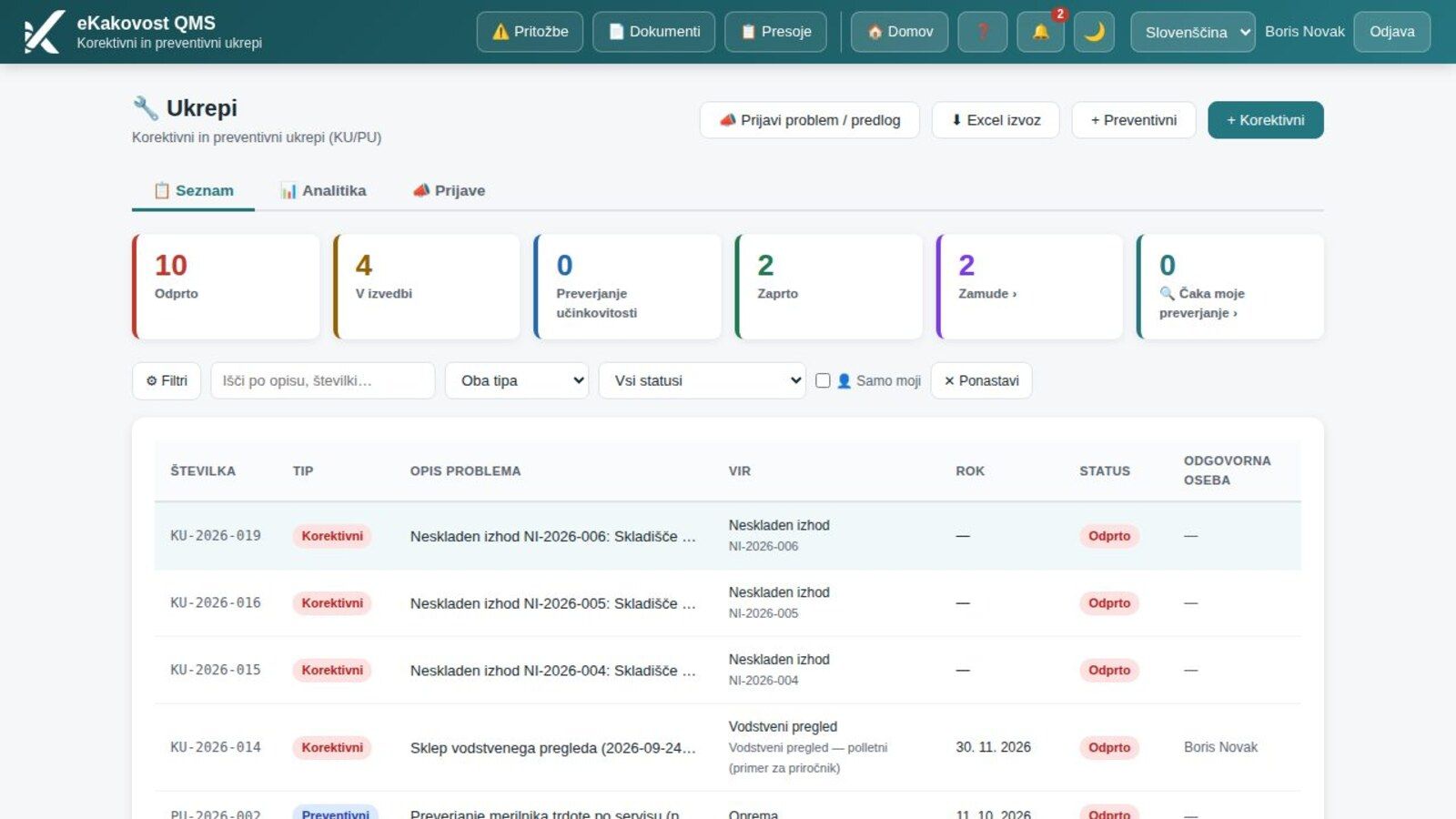
Every action gets a number (KU-2026-019 for corrective, PU-2026-002 for preventive), a description, a source, a deadline, a responsible person and a state: Open, In progress, Effectiveness check or Closed. Counters above the list show how many actions are in each state, how many are late and how many wait for your check.
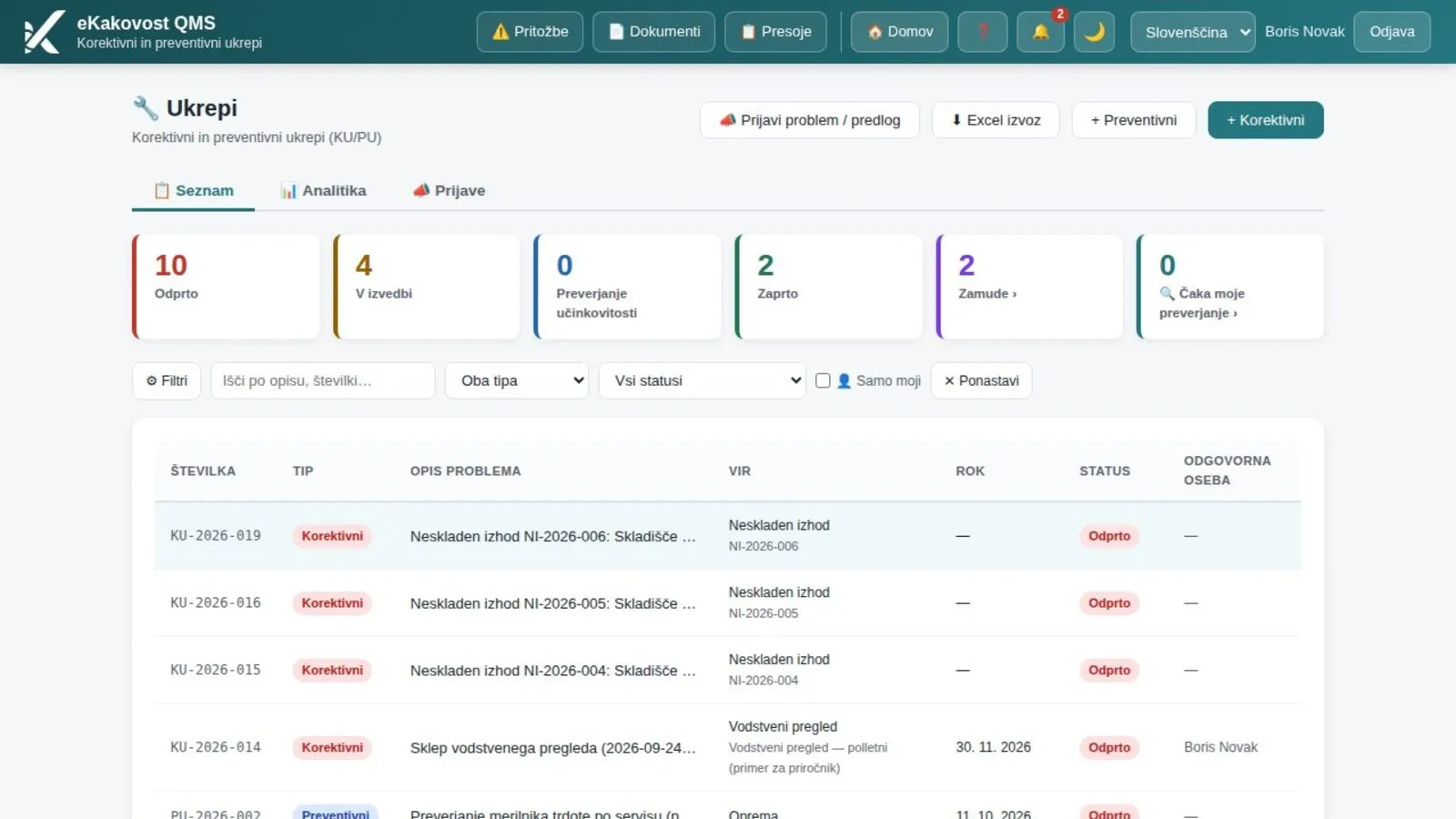 The action list: state counters at the top, below them CA and PA with the problem source, deadline and responsible person.
A new action needs only a few fields: type, description, responsible person and deadline (30 days by default). The quality manager is notified of every new action, and the responsible person gets reminders before the deadline and when it is missed. An action cannot be deleted; an administrator can only archive it, so the trail stays.
2. An action starts where the problem happens
You do not need to retype actions from reports. One can arise from an audit (the “Request action” button on a nonconformity), a complaint, an internal finding, an external factor, a risk or a supplier. The source and text carry over and the action stays linked to the originating record. An employee can also report a problem or suggestion through the “Report a problem / suggestion” button, and the quality manager converts it into an action with one click.
3. Root cause analysis: 5 Whys, Ishikawa, 8D
This is where the difference between a correction and an action shows. In the analysis you choose a method: 5 Whys (a chain of answers down to the cause), Ishikawa (six directions of possible causes) or 8D as the report framework for a customer. Before the cause is known you also record the containment action that stopped the damage; its time is stamped on first save and never changes later.
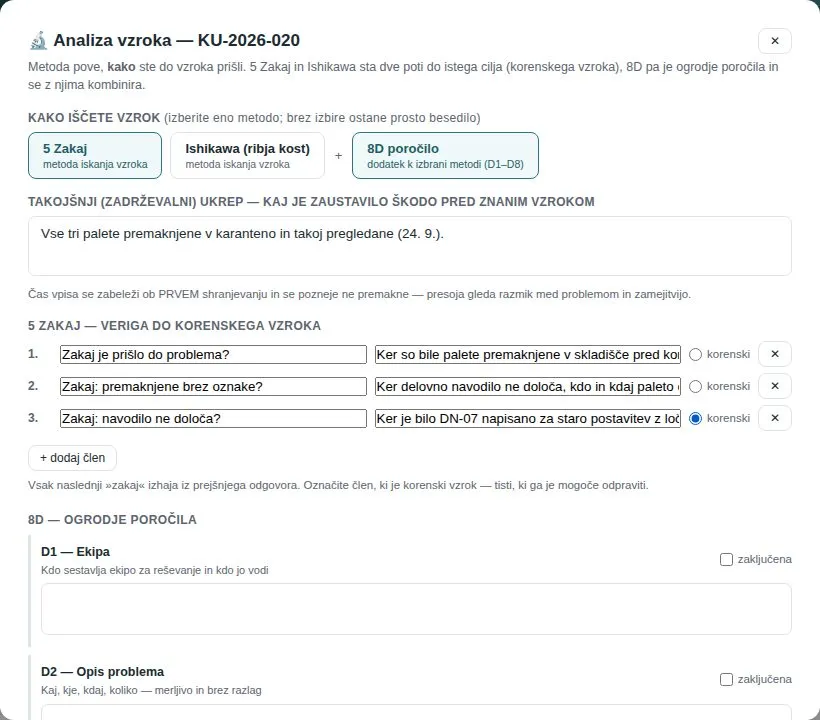 Cause analysis: a containment action, a chain of “whys” and a marked root cause, the one that can be eliminated.
You then define the problem with Is / Is not differences (what is happening and what could be but is not), place the cause in a category that feeds the Pareto, and rate severity: RPN = severity × occurrence × detection (from 1 to 125, 60 and above is high priority).
4. An effectiveness criterion and repeat detection
An action without a criterion cannot be closed with proof. So you enter a criterion (what must hold for the action to be effective) and an observation window in days. The window starts when the implementation is submitted for checking, because the effect of an action that has not been carried out yet cannot be observed; an action cannot be submitted for checking without a criterion. When the window ends, the module reminds the verifier and administrators to confirm the outcome.
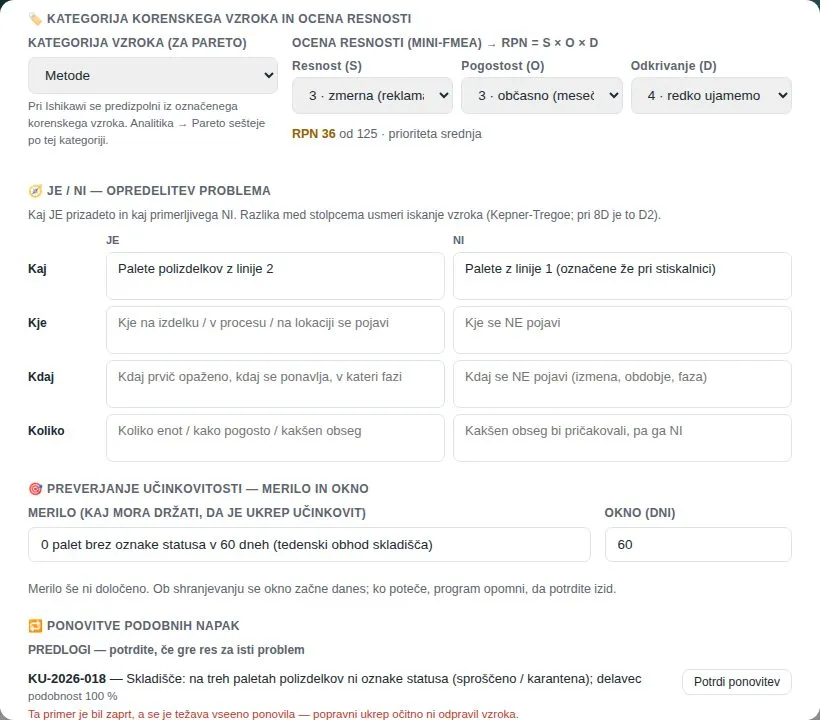 A severity rating (RPN 36), Is / Is not, a criterion with a 60-day window and a suggestion of a similar older action.
The module also detects recurrence: if a similar problem has already been closed, it suggests it and you confirm the link. A closed action then shows that its effectiveness is at risk, since a recurrence means the action did not remove the cause.
5. Evidence and independent verification
You document the state with attachments before, during and after the implementation (photos, documents), so you do not explain to the auditor, you show. When the responsible person submits the implementation, the action moves to the effectiveness check. Only someone other than the person responsible for implementation can verify it: they record their findings and the outcome. If the action is effective it closes; if not, it returns to implementation.
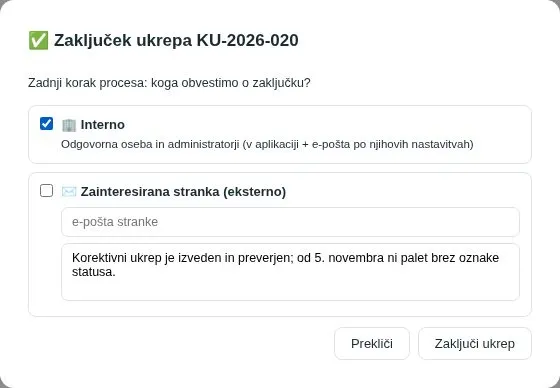 Closing an action: notify the internal owners and, if you wish, an interested party, such as the customer who raised the complaint.
On closure the module notifies the responsible person and administrators and, if you wish, sends an e-mail to an external interested party. The whole flow can be printed as a PDF that also serves as an 8D report, or exported to Excel.
6. Analytics: where problems really start
Individual actions fix individual problems. Looked at together, they tell the quality manager far more. The Analytics tab shows effectiveness by person (assigned, closed, average days, share within the deadline), a 12-month trend of open and closed actions and a Pareto of root causes with the “vital” categories marked, the ones that together cause 80 % of problems.
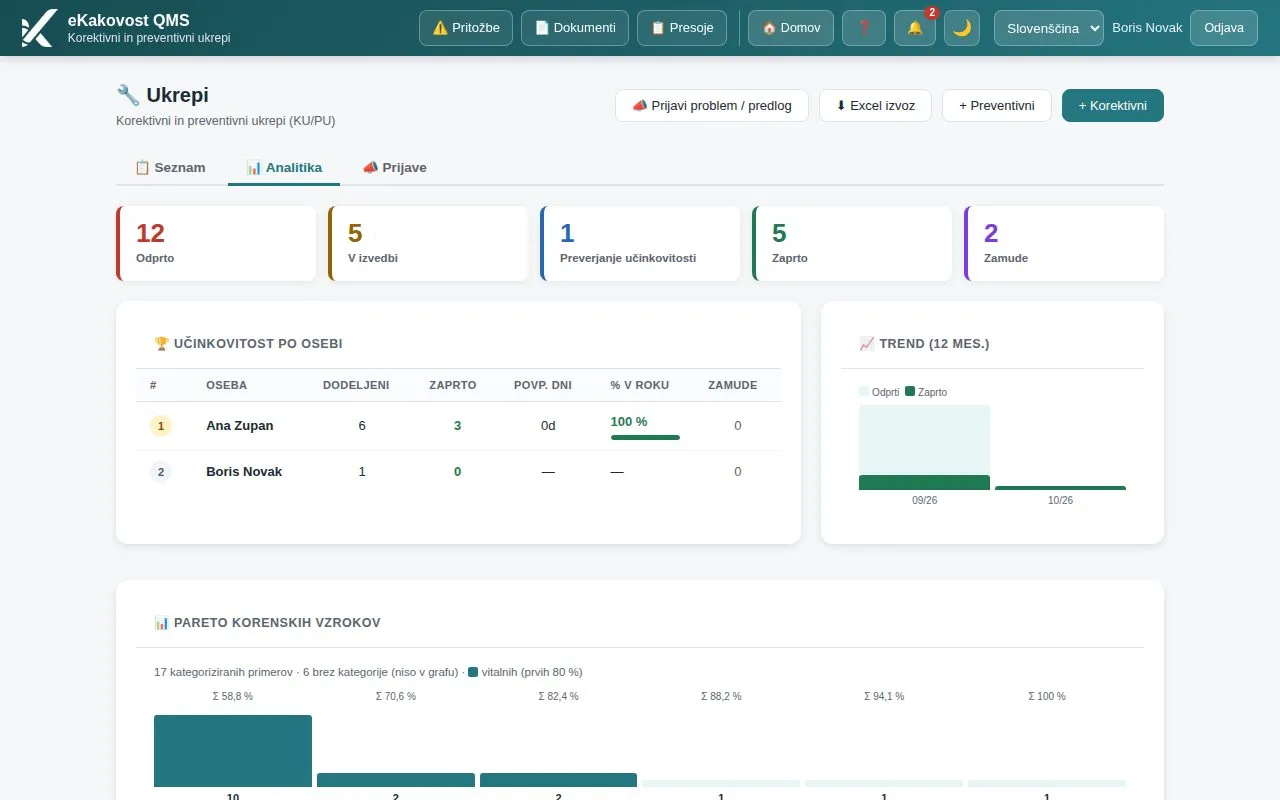 Action analytics: effectiveness by person, a trend and a Pareto that shows where systemic solutions are worth looking for.
This is the input for management review (clause 9.3) and improvement (clause 10.3): you do not look for who made the mistake, but for which category of causes creates the most actions.
What the quality manager gains
| Without a system | Actions module | |
|---|---|---|
| Action records | Excel and e-mail | One list with live states and counters |
| Problem source | Retyped from a report | An action arises from an audit, complaint, risk or report |
| Cause | “Worker error” | 5 Whys, Ishikawa or 8D with a marked root cause |
| Effectiveness | Nobody checks it | Criterion, observation window, independent verifier |
| Recurrences | Found by chance | A suggestion of similar actions, link confirmed by a person |
| Evidence | Photos on phones | Attachments before, during and after |
| Management review | Gathering data by hand | Analytics, trend and Pareto in one click |
Who uses the module
- The quality manager, who sees which actions are late and which wait for a check, and shows management a Pareto instead of impressions.
- People responsible for actions, who get a deadline, a reminder and a clear goal instead of a vague task.
- Verifiers, who have everything in one place, from analysis to evidence, and record an independent outcome.
- Employees, who report a problem or suggestion without an Excel form.
- The auditor, who gets the chain from nonconformity to verified effect in one record.
Book a free consultation. In 30 minutes we show you how your nonconformities, complaints and audit findings would live in the Actions module: from the report to a verified effect, on an example from your industry. Choose a time →
If you are only introducing ISO 9001, a well-kept record of corrective actions is one of the first proofs that the system really works. Slovenian companies can obtain a subsidy of up to 60 % for implementing ISO standards.
Frequently asked questions
What does ISO 9001 require for corrective action?
Clause 10.2 requires that, when a nonconformity (including a complaint) occurs, you react to it and deal with the consequences, evaluate whether the cause needs to be eliminated so the nonconformity does not recur, implement the action needed, review its effectiveness, update risks if necessary and change the management system. You must retain documented information on the nature of the nonconformity, the actions taken and their results.
What is the difference between a corrective and a preventive action?
A corrective action (CA) removes the cause of a nonconformity that has already occurred; a preventive action (PA) removes the cause of a problem that has not happened yet. Current standards no longer require preventive action as a separate procedure, since it is replaced by risk-based thinking (clause 6.1), but many companies still manage it in practice. In the Actions module CA and PA follow the same flow with separate numbering.
How do I find the real cause of a problem?
With the method that fits the problem: 5 Whys for simpler cases (each next “why” follows from the previous answer), Ishikawa for problems with several possible causes, and 8D as the report framework for a customer. What matters is marking the cause as the root cause, the one that can be eliminated, rather than a symptom. In the Actions module you choose the method and record the cause in the action’s analysis.
When is a corrective action effective?
When the problem does not return within a set period. That is why you enter a criterion (what must hold) and an observation window (e.g. 60 days), which starts when the implementation is submitted for checking. When the window ends, the action is checked by someone other than the person responsible for implementing it; only then is it closed. If the effect is not confirmed, the action returns to implementation.
Can I open an action directly from an audit or a complaint?
Yes. In the Audits module every nonconformity has a “Request action” button, and an action can also arise from a complaint, an internal finding, a risk or a supplier. The source and text carry over, the action stays linked to the originating record and you retype nothing.
Read next
Transparency: artificial-intelligence tools were used in preparing this article. The content was reviewed and approved by the author.