
The auditor asks: “Who is allowed to drive the forklift, and when does the health-and-safety certificate expire?” The answer is usually in a binder. Somewhere. Certificates sit in an HR drawer, deadlines in someone’s calendar, and only the head of department knows who needs which training. When a certificate expires, nobody notices until the audit comes round or, worse, an accident.
In this post we show how the Training module of the E-kakovost QMS platform manages employee competence: from a competence matrix that shows the whole company on one screen, to a certificate with every attendance, a reminder before expiry and a printout for the audit.
What the standard asks of your training
ISO 9001 clause 7.2 requires the company to determine the competence needed by people whose work affects quality, to ensure they acquire it (through training, education or experience) and to retain evidence of it. Where applicable, it must also evaluate whether those actions were effective. Clause 7.3 adds that people must be aware of the quality policy, their own contribution and the consequences of nonconformity. And clause 7.1.6 requires the company to maintain the knowledge it needs to do its work and to make it available.
The standard does not prescribe a matrix or a form. It prescribes that, for every person, you can show three things: what they need to know, whether they know it and how you prove it. That is exactly what the auditor looks at. The Training module ties all three together in one record.
How training lives in the Training module
1. The competence matrix: one view for the whole company
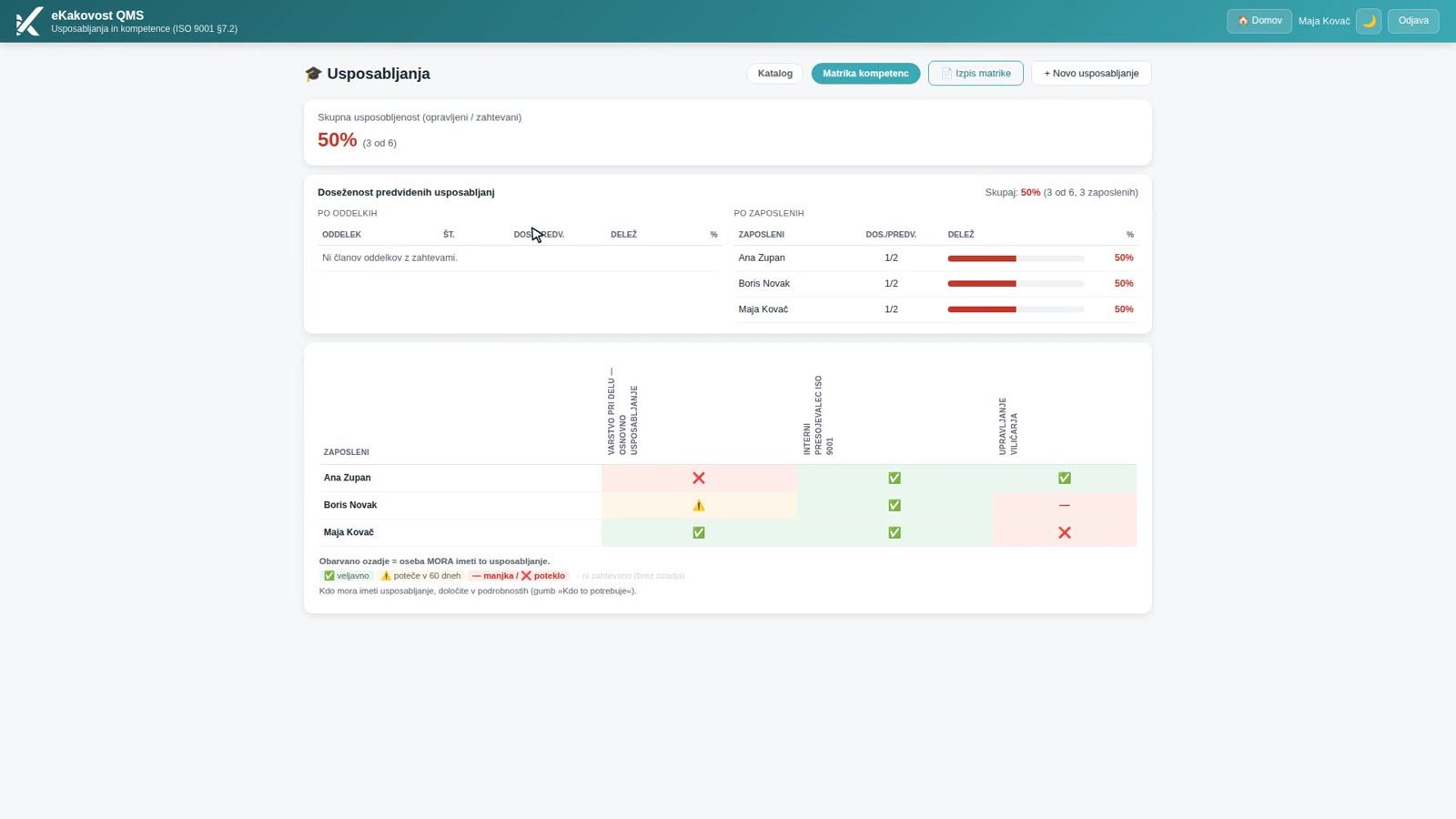
The competence matrix is a table: a row is an employee, a column is a training course. The symbol in a cell shows the state: ✅ valid, ⚠️ expires within 60 days, ❌ expired, “—” never completed. Green means all is well, yellow means it is time to arrange the renewal, and red means the person is working without valid training.
 The competence matrix: overall competence and coverage by employee at the top, the person × training table below.
Above the table is the overall competence: the share of required training that people hold as valid. The percentage is green at 90% and above, orange from 60% and red below 60%. It is broken down by department and by employee, so the quality manager sees at once which department is lagging. A selector above the matrix shows only the employees whose training expires within 30 or 60 days or has already expired. The same percentage appears on the KPI dashboard and in the management review, because the same rule computes it.
2. Who needs which training
The matrix only makes sense once it is clear who needs a training at all. Production needs the forklift course, accounting does not. So for every training you define who needs it: a department or a position from the organisational structure (the requirement also covers all sub-units), an individual as an exception, or you mark the training as mandatory for everyone (e.g. occupational safety).
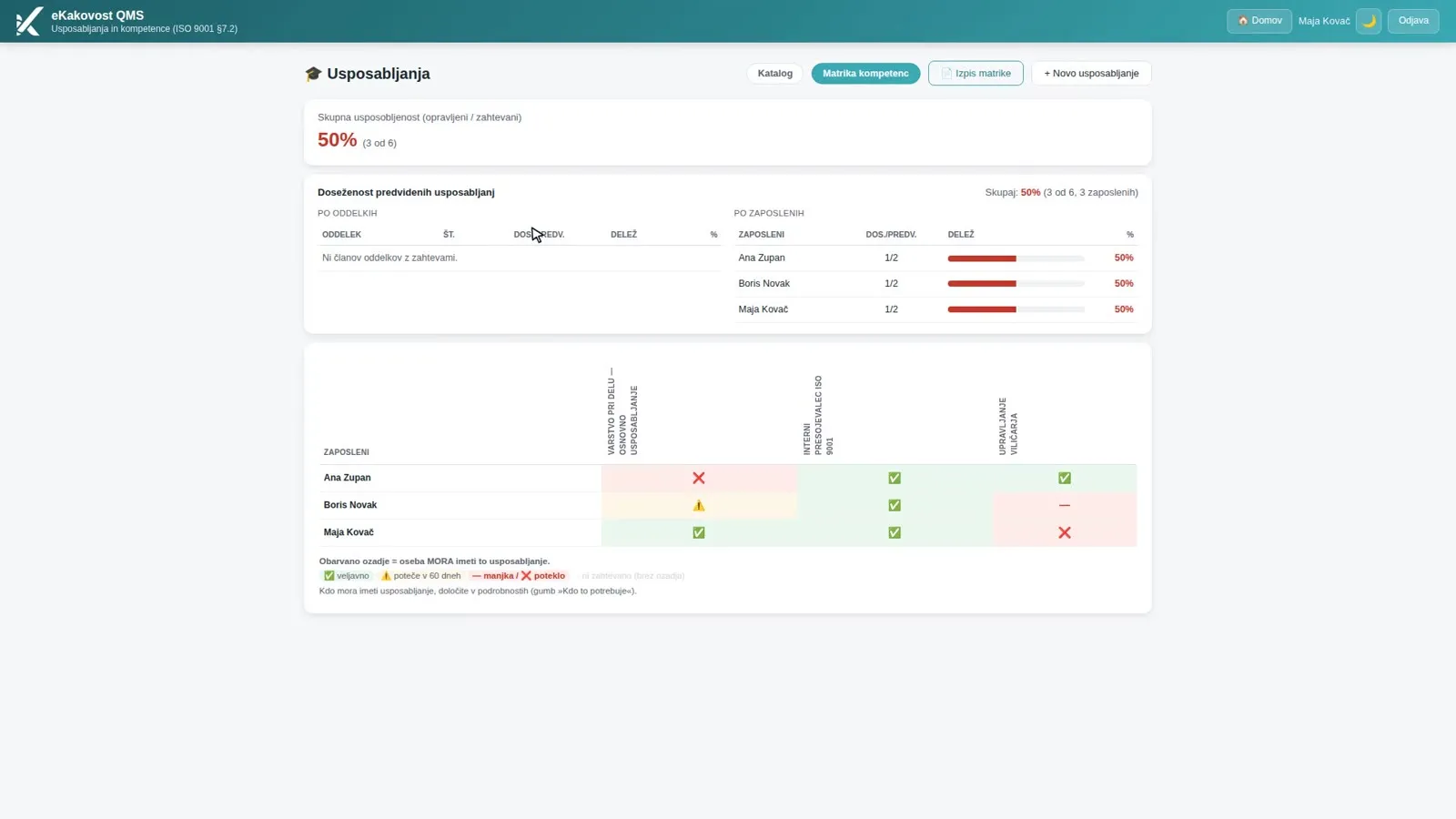
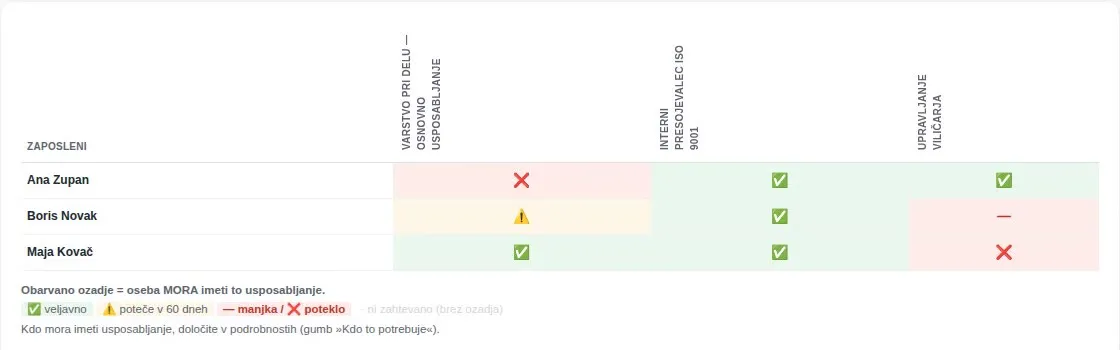 A coloured background means the person must have the training. A cell without a background is not required and does not lower the percentage.
This is clause 7.2 a in practice: competence is not defined in a separate document but directly in the record that checks it. If someone completes a training they do not need, the matrix shows it, but it does not count towards the percentage. When you remove a requirement, the percentage is recalculated immediately, while attendance records and certificates remain.
3. A catalogue of internal and external training with validity
The catalogue holds your types of training: internal, external and e-learning, with the provider and the validity in months (e.g. 24 for occupational safety, 36 for the forklift) or no expiry at all (e.g. induction on starting work). Each row shows the type, provider, validity and number of attendance records, and mandatory training carries a MANDATORY badge.
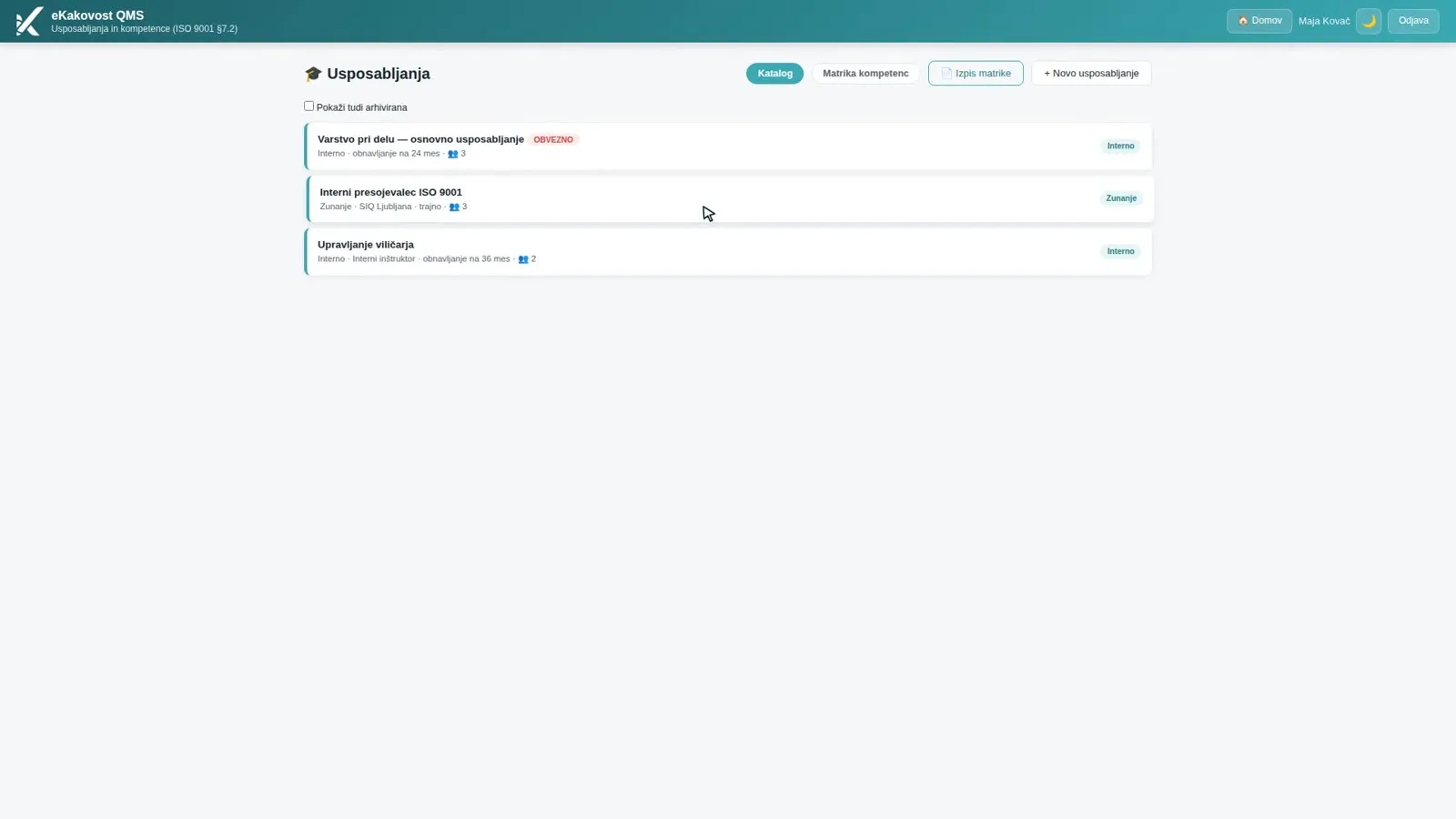 The catalogue: type, provider, validity and number of attendance records for each training.
Keep the catalogue short: one training is one kind of knowledge that you renew or prove. A single session is not a new training but the date of an attendance. A training you no longer use is archived: it disappears from the catalogue and the matrix, while its attendance records and certificates stay as evidence for the audit.
4. Attendance with a certificate: the evidence in one place
Once a training has taken place, you record attendance: one person or a whole group (e.g. 30 workers at a periodic occupational safety session) with one date and one attendance list. You attach the certificate or the signed attendance list as a PDF or an image. The module works out the “valid until” date from the validity in the catalogue, so nobody has to calculate it by hand.
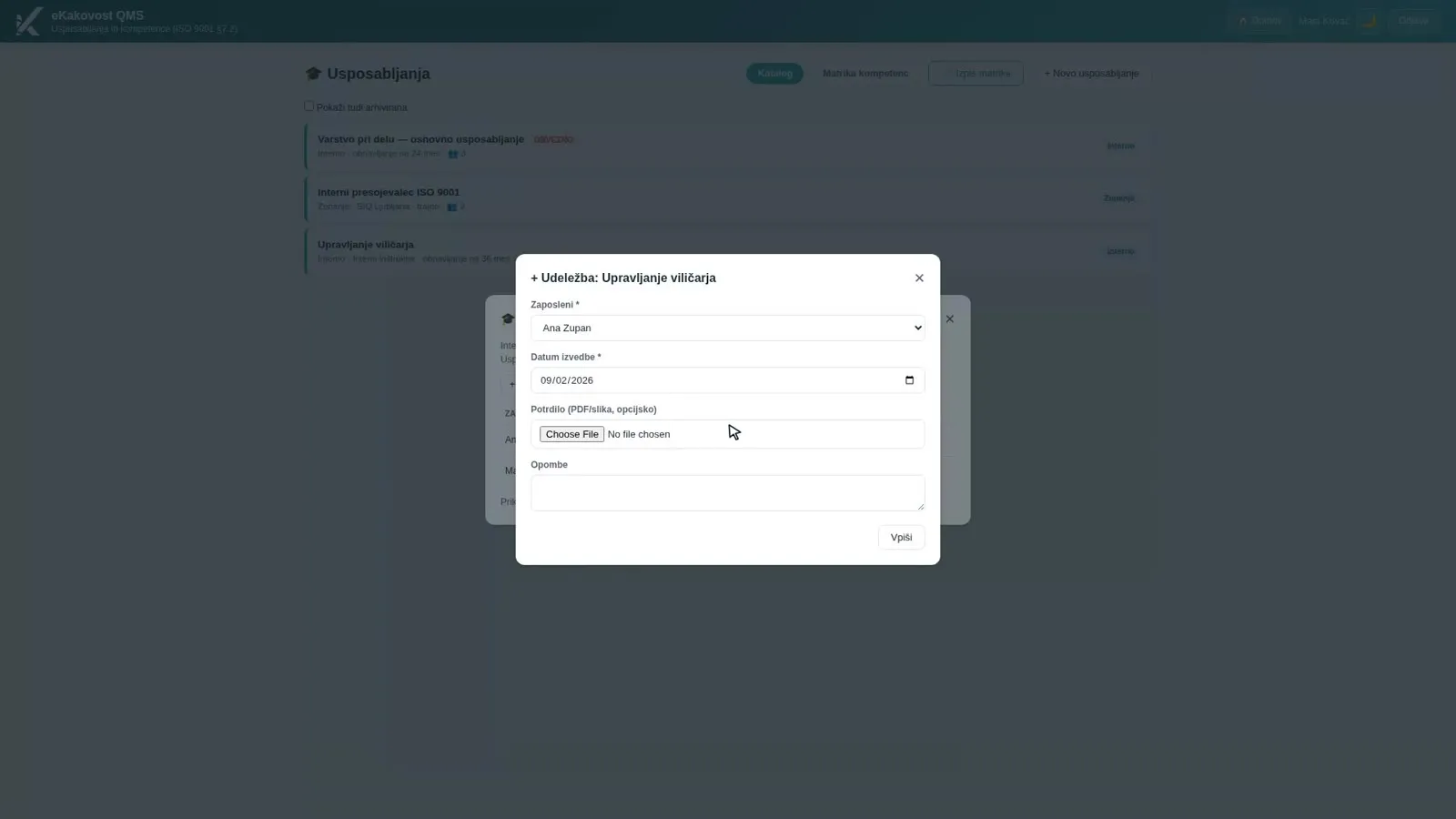 Recording attendance: person, date completed, certificate and notes. The “valid until” date is calculated automatically.
An attendance record is evidence, so a future date cannot be entered, and a repeated entry for the same person on the same day is skipped. A wrong entry is not deleted but cancelled with a reason: it disappears from the matrix, while the certificate and the trail remain. For each attendance you can also record whether the training was effective and how you checked it (clause 7.2 c). Workers without a user account, for example in production, are kept as people without an account and do not count towards the licence. If the company has AI switched on, you can also import a certificate or an attendance list: the AI reads the document, and you review and confirm every row.
5. A reminder 60 and 14 days before expiry
A deadline should not depend on anyone’s memory. 60 and 14 days before expiry the person gets a notification in the platform and an e-mail asking them to arrange the renewal. No reminder is sent if a newer attendance has been recorded in the meantime. The expiry also appears in the Planner as an event, so whoever organises training sees it.
A renewal is recorded as a new attendance with a new date, and the old one stays in the history. The state in the matrix is always set by the latest attendance. For knowledge written down in documents (clauses 7.1.6 and 7.3), an administrator can switch on a short comprehension quiz on a work instruction: when an employee passes it, the attendance is recorded automatically.
6. A matrix printout for the audit
The Matrix report button prepares a landscape PDF with your company’s header: the person × training table with the completion date and the “valid until” date under each symbol, a legend and the footer “Authentic system report · ISO 9001 §7.2”. A shaded cell means the training is required for that person, and the compliance summary shows the same percentage as the matrix.
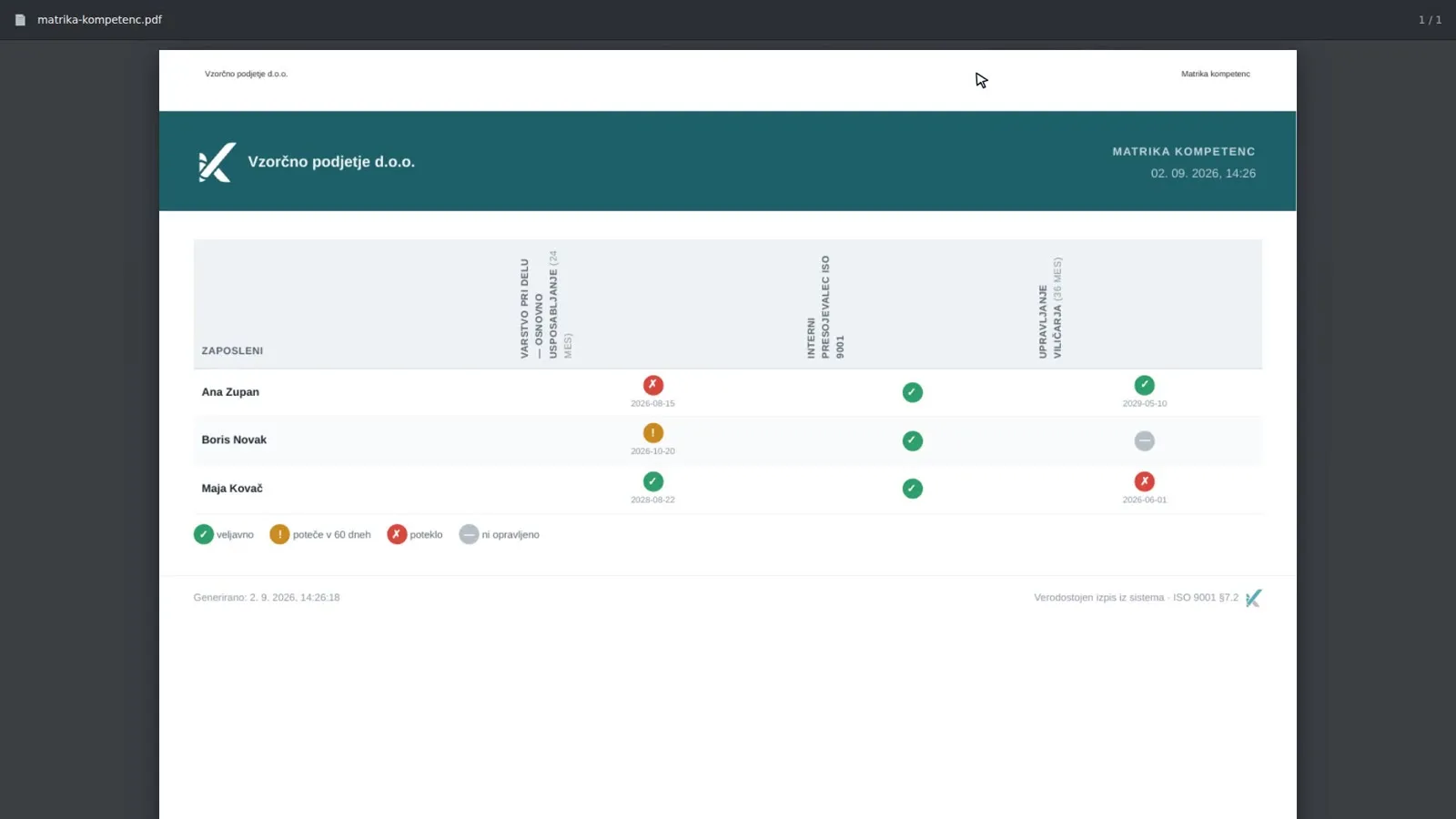 The competence matrix report: a table with dates under each symbol, prepared in one click.
The report is suitable for an audit or the management review. In the management review, a link next to the inputs opens the catalogue narrowed to the training carried out in the review period, so the numbers in the review and in the module agree.
What the quality manager gains
| Without a system | Training module | |
|---|---|---|
| Overview | Certificates in a binder, deadlines in a calendar | A competence matrix for the whole company on one screen |
| Who needs what | In the head of department’s head | Requirements by department, position or person |
| Validity | Dates calculated by hand | “Valid until” calculated from the catalogue on entry |
| Evidence | Searching through drawers | A certificate with every attendance, one click away |
| Expiry | Noticed when it is too late | A reminder 60 and 14 days ahead, an event in the Planner |
| Wrong entry | Crossed out or deleted | Cancelled with a reason, the trail stays |
| Audit preparation | Building a table by hand | A PDF matrix report in one click |
Who uses the module
- The quality manager, who has an overview of competence across the company and shows management the percentage, which is an input to management review.
- HR, who records attendance with certificates and defines who needs which training.
- Employees, who see in “My training” what they need, until when it is valid and where their certificate is.
- People responsible for occupational health and safety, who use the same register of people to keep production workers without a user account.
- The auditor, who sees, for each person, the requirement, a valid attendance and the certificate in one record.
Book a free demo. In 30 minutes we show you how your training would live in the Training module: from the catalogue to the competence matrix, on an example from your industry. Choose a time →
In our previous post we showed how the Complaints module makes sure no complaint gets lost in e-mail. The competence matrix is one of the first pieces of evidence an auditor asks for, which makes it a good place to start preparing for an internal audit. If you are only introducing ISO 9001, a training record with clear requirements and deadlines is good proof that your quality management system really works.
Frequently asked questions
What does ISO 9001 require for the competence of employees?
Clause 7.2 requires the company to determine the competence needed by people whose work affects quality, to make sure they acquire it and to retain evidence of it. Where applicable, it must also evaluate whether the training was effective. The standard prescribes no form, but an auditor will expect you to show, for each person, what they need to know and how you prove it.
What is a competence matrix and how do I read it?
The matrix is a table where each row is an employee and each column is a training course from the catalogue. The symbol in a cell shows the state (valid, expires within 60 days, expired, never completed) and the background colour shows whether the person is required to have that training. Above the matrix is the overall competence percentage, which counts required training only.
How do I find out that a training is about to expire?
When attendance is recorded, the module works out the “valid until” date from the validity set in the catalogue. 60 days before expiry the cell in the matrix turns yellow, and the person gets a notification in the platform and an e-mail 60 and 14 days before expiry. The expiry also shows in the Planner, so whoever organises the training sees it too.
Do I have to record workers who do not use the platform?
Yes, you need a competence record for all workers, including those in production. In the module you keep them as people without a user account: they do not count towards the licence, but they appear in the matrix and you record their attendance. As they have no e-mail in the platform they get no reminders, so you follow their status in the matrix.
How do I show that a training was effective?
For each attendance you choose a rating (effective, partly effective or not effective) and write down how you checked it, for example a knowledge test or on-the-job observation. The rating shows in the attendance table, and any later change is written to the audit trail. Ineffective training is a signal to act, for example to repeat it or change the provider.
Read next
Transparency: artificial-intelligence tools were used in preparing this article. The content was reviewed and approved by the author.