“Are we an obliged entity under ZInfV-1? And if we are, what do we need to have in place by December?” This autumn the question is on the desk of many managing directors and quality managers in Slovenia. The first reaction is often a new folder, a new spreadsheet and the feeling that a new project is starting from scratch. For a company that already has a quality management system, that is not the case: documents, internal audits, management review, the risk register and corrective actions are already there. What is missing is mainly what a quality standard does not cover: what you protect, which controls you apply and how you handle an incident.
In this post we show how two new modules of the E-kakovost QMS platform, Information Security and Security Incidents, cover this: from an information asset register, through the obligations of ZInfV-1 and the ISO/IEC 27001 controls, to a statement of applicability and an incident with statutory deadlines. Both are available as add-on modules of the platform.
What the law and the standard require
ZInfV-1 (the Slovenian Information Security Act, Official Gazette of the Republic of Slovenia No. 40/25) transposes the European NIS 2 directive (Directive (EU) 2022/2555) into Slovenian law. As a rule, the obliged entities are medium-sized and large companies in the sectors listed in the annexes to the act. Whether you are one of them, and whether you are an essential or an important entity, has to be assessed for each company separately.
New obliged entities have to put their documentation and measures in place within a transition period of 18 months from the act’s entry into force (Article 62). According to the guidance of URSIV, the Slovenian Government Information Security Office, this means by 19 December 2026. For a significant incident, Article 30 sets three deadlines: an early warning within 24 hours of detection, an incident notification within 72 hours and a final report within one month of the notification.
ISO/IEC 27001:2022 is the international standard for an information security management system. It has the same structure of clauses 4 to 10 as ISO 9001 (context, leadership, planning, support, operation, performance evaluation and improvement), plus 93 Annex A controls and a statement of applicability. The law and the standard overlap to a large extent: the evidence you prepare for a control of the standard is often also evidence for an obligation under the law.
What a company with a quality system already has
In the Standard implementation module, the platform places the ISO/IEC 27001 framework next to ISO 9001. Because both standards share a common structure, whatever has been done for ISO 9001 also counts for clauses 4 to 10 of ISO/IEC 27001: the policy, roles and responsibilities, document control, internal audit, management review and corrective action. The new work lies where a quality standard has nothing to say: the asset register, information security risks, controls and incidents.
The ZInfV-1 framework in the Standard implementation module contains 56 obligations by article of the act, prepared from the text of the act and the guidance of URSIV, together with an entity profile (essential or important entity). There are 109 links between the law and the standard: evidence you have confirmed for an ISO/IEC 27001 control is offered for the matching ZInfV-1 obligation, and the other way round. Offered, not transferred: a person confirms the link, nothing happens automatically.
How it works in the E-kakovost QMS platform
1. Information asset register: what you protect and who is responsible
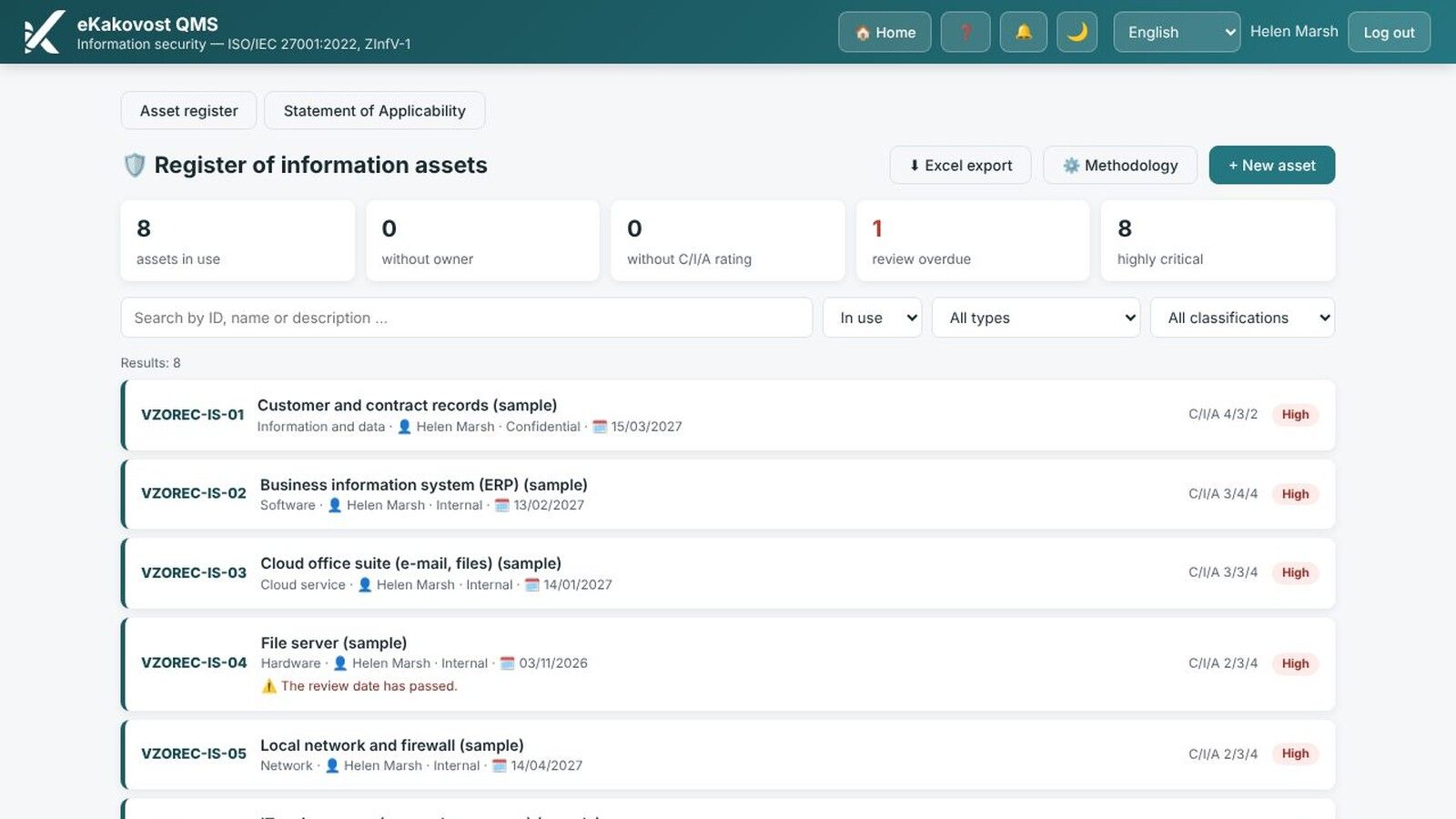
The register holds everything that needs protecting: information and data, software and hardware, cloud services, the network, people and premises. Each asset has an identifier, an owner (accountable for it) and, if needed, a custodian (manages it day to day), a supplier and a next review date that appears in the Planner. Hardware that is already in the Equipment module is not entered twice: the asset simply points to it.
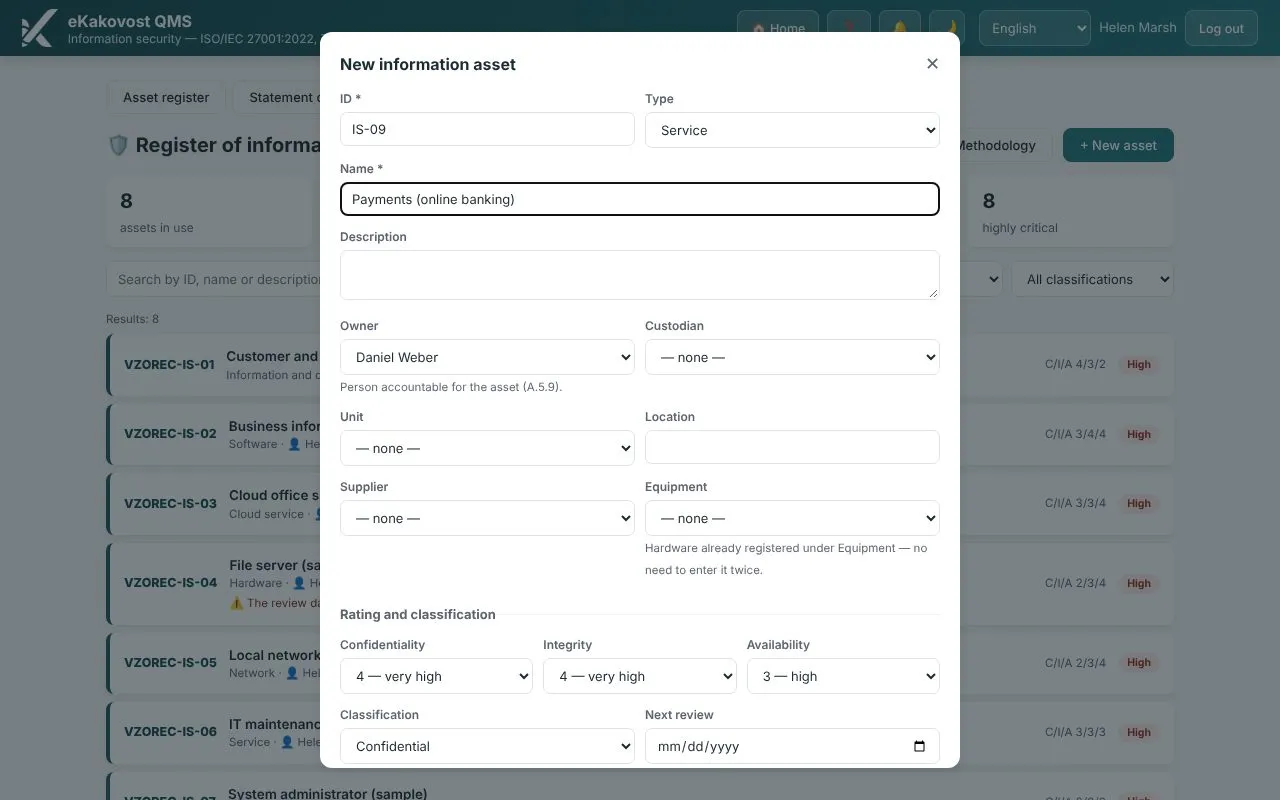 A new asset: owner, confidentiality, integrity and availability rated from 1 to 4, classification and review date.
You rate confidentiality, integrity and availability from 1 to 4 and choose a classification (public, internal, confidential, strictly confidential). You do not enter the criticality: the platform calculates it from the ratings using the methodology set by the administrator. Above the list are gap counters: assets without an owner, without an assessment, without a classification and with an overdue review. An asset is not deleted but withdrawn with a reason, so its history remains.
2. Information security risks in the same risk register
Information security risks do not live in a second register. You enter them in the Risks module, where they get an Information security view: threat, vulnerability, impact on confidentiality, integrity and availability, treatment (reduce, accept, transfer or avoid) and acceptance of the residual risk. For each risk you choose the ISO/IEC 27001 controls that address it and the assets it affects.
In the Suppliers module, suppliers get an ICT criticality rating, and an asset shows which supplier provides it. So you can see in one place which external providers your key systems depend on.
3. Statement of applicability with issues and PDF
For each of the 93 controls, the statement of applicability shows whether it is applicable, why it is included (risk, law, contract or business need) and how far its implementation has progressed (planned, partial, implemented). The “risk” reason is derived automatically from the link between a risk and a control. An excluded control needs a justification, and a control you selected for a risk but also excluded is shown as an inconsistency.
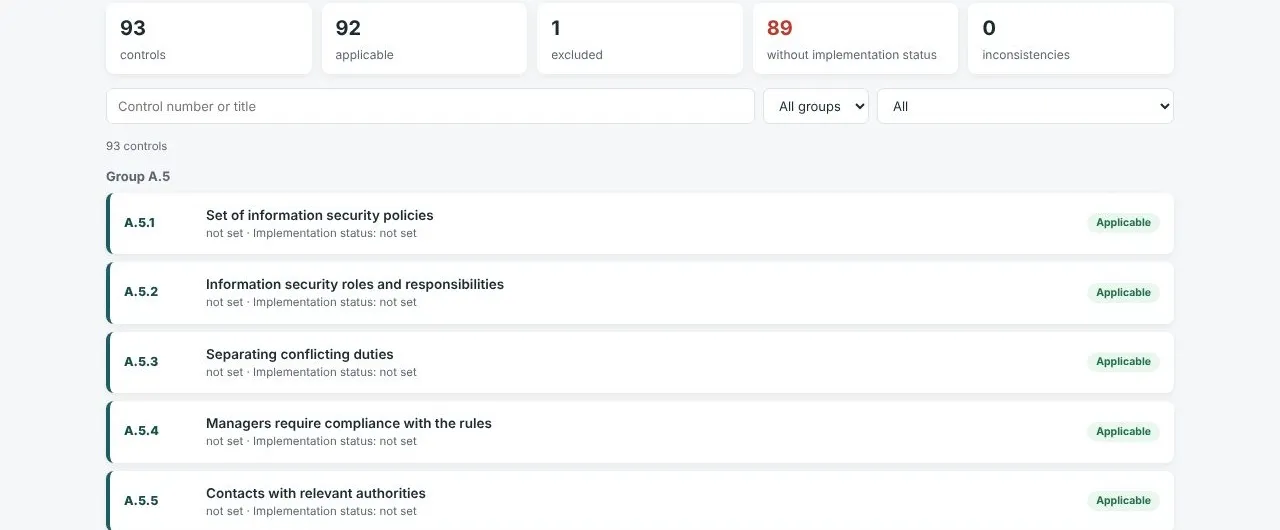 Statement of applicability: control counters, filters by group and applicability, and the list of controls with applicability and implementation status.
When the statement is ready, you issue it: the platform stores an unchangeable snapshot of all controls with the version, the date and the people who issued and approved it, and prepares a PDF. Each new issue gets the next version and earlier ones remain. You can show the auditor exactly the statement that was valid on a given day. For internal audits there is an ISO/IEC 27001 questionnaire with 111 questions in the Audits module.
4. A security incident: reporting, and a classification decided by a person
Anyone who can see the module can report a security event, from a phone as well: what they noticed (a suspicious e-mail, unauthorised access, a system outage, a lost laptop) and when. The responsible person and the information security contact are notified. Above the list, the register shows open incidents, open significant incidents, missed statutory deadlines and incidents awaiting assessment.
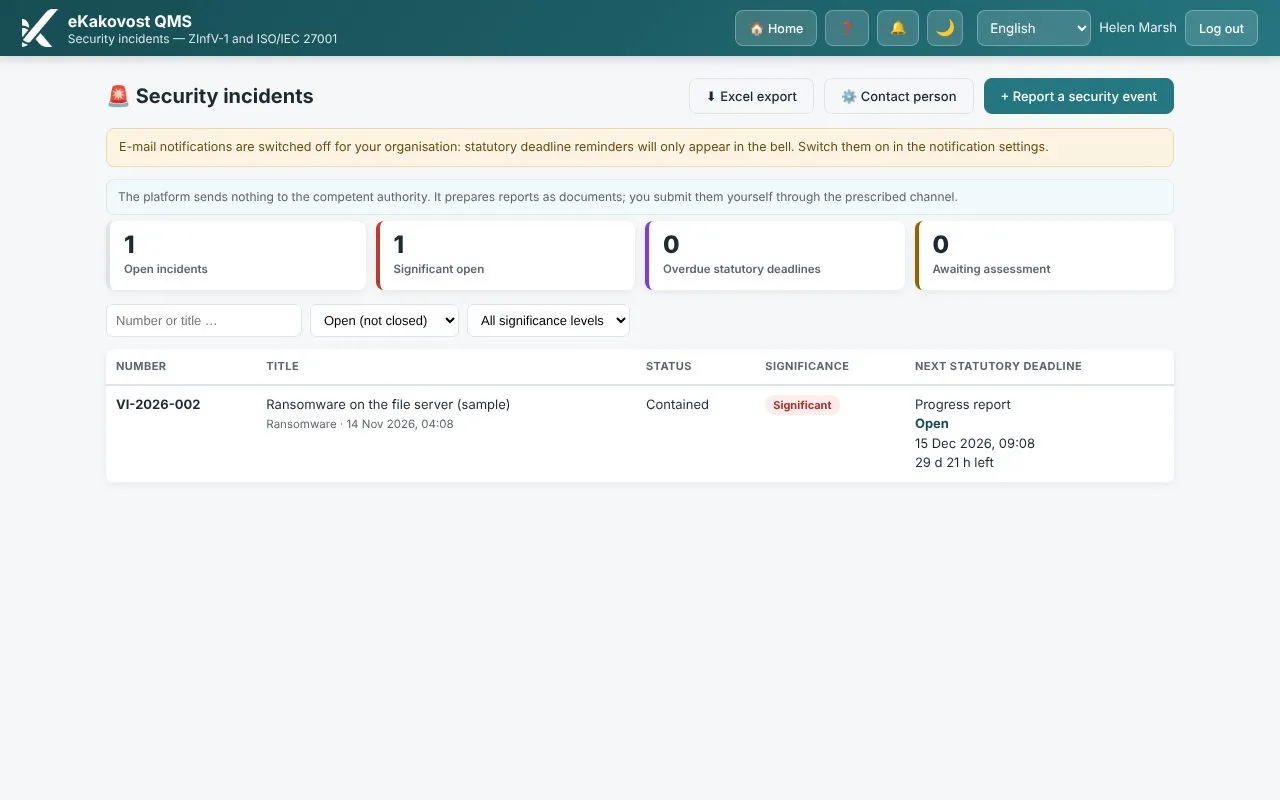 The incident register: status, significance and the nearest statutory deadline with a countdown.
Whether an incident is significant is decided by a person. In the Classification tab you tick the criteria that apply and, if you wish, choose a severity on the URSIV scale. The platform only shows a suggestion; if you decide differently, you record a justification. You also check the time of becoming aware of the significant incident, because the deadlines run from it.
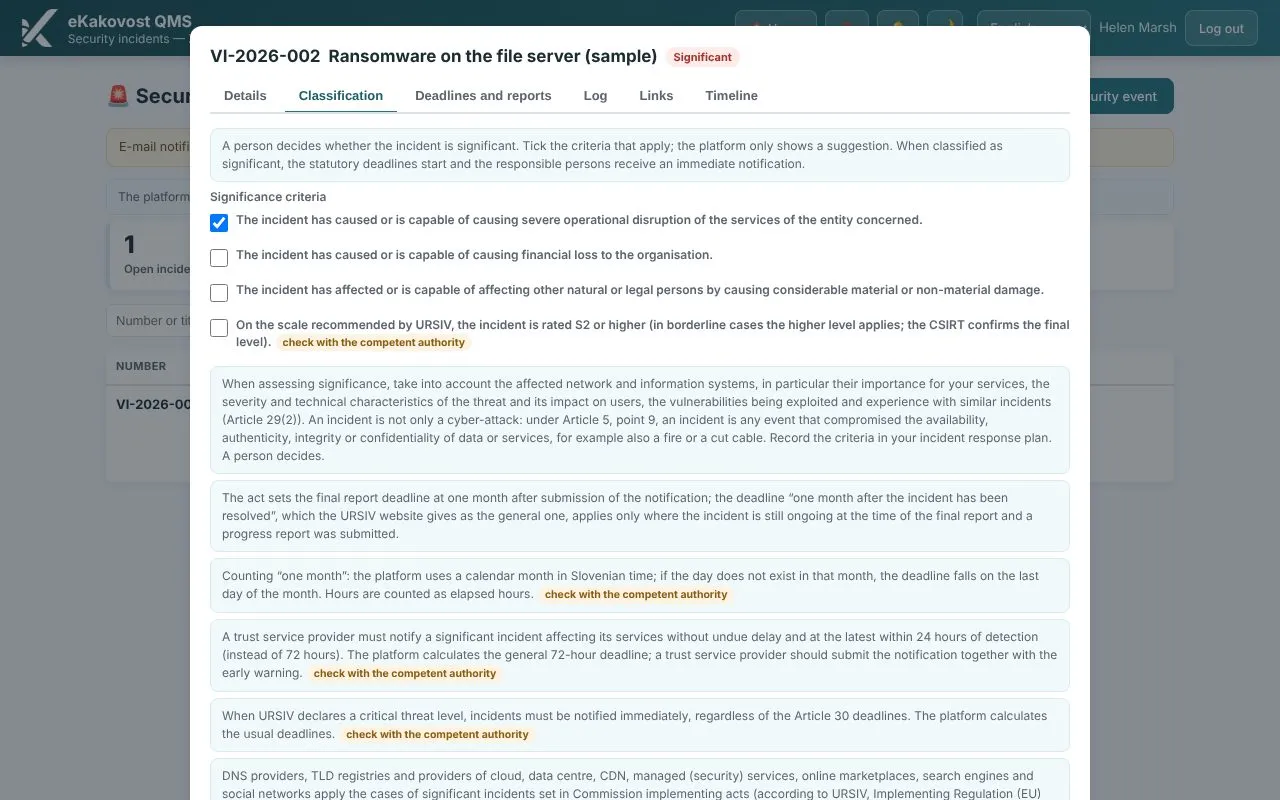 Classification: significance criteria with explanations; a person decides whether the incident is significant.
5. Statutory deadlines, reminders and reports as documents
When an incident is classified as significant, the deadlines under Article 30 of ZInfV-1 appear: an early warning within 24 hours, an incident notification within 72 hours and a final report within one month, and a progress report if the incident is still ongoing. Each deadline has a countdown. Reminders arrive before a deadline and when it is missed, with escalation to administrators, also over the weekend and on the organisation’s days off.
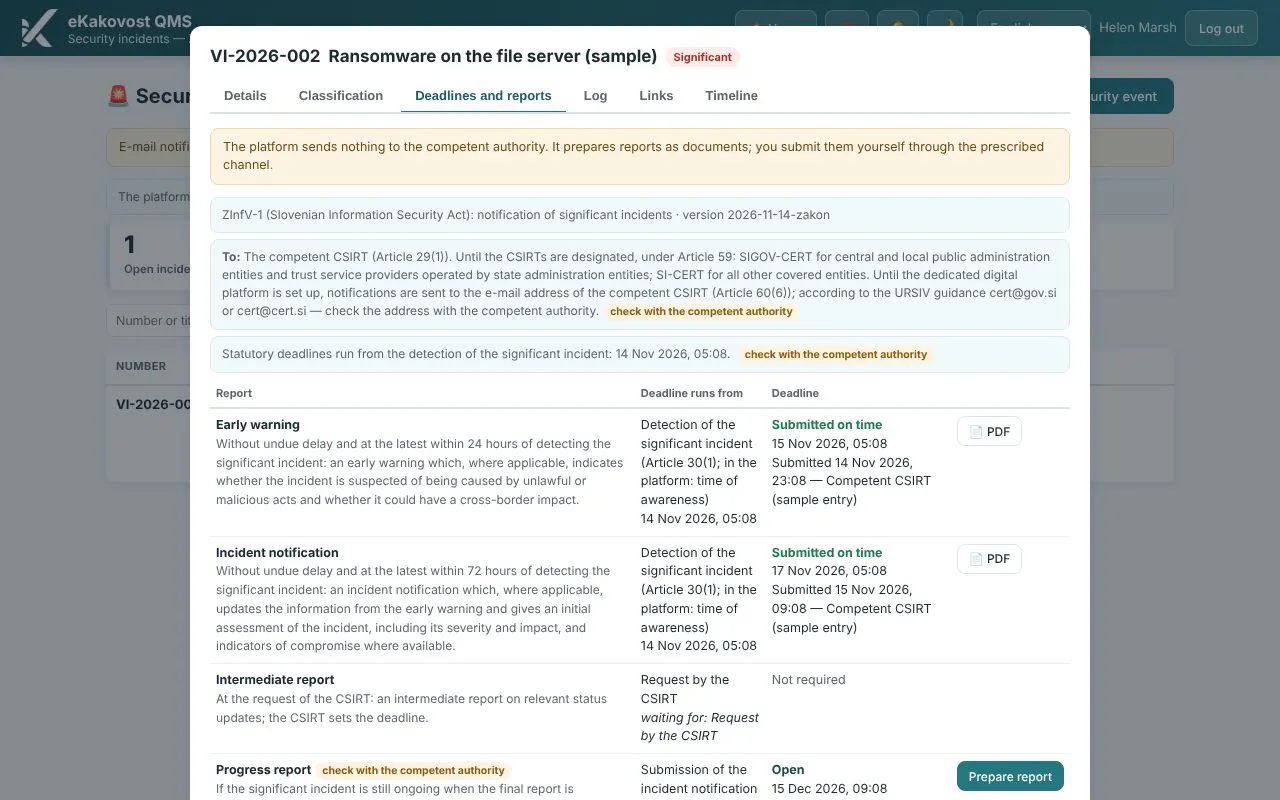 Deadlines and reports: early warning and notification submitted, and the deadline of the next report.
The Prepare report button creates a PDF report with a mandatory legal notice. The platform sends nothing to the authority: you submit the report yourself through the prescribed channel, then mark it as submitted and record when, to whom and how. A submitted report is locked. The handling log records every action and cannot be edited, and a confidential incident is visible only to a small circle of people. From the incident you open a corrective action in the Actions module and link it to risks, suppliers and assets.
6. Management overview and indicators
The management page has an information security block: readiness by framework, gaps in the asset register, risk treatment, open significant incidents and the status of the statement of applicability. The same overview is an input to the management review and a PDF report for management. The KPI module has indicators for open significant incidents and the share of reports submitted on time. KPI now also accepts external indicators from other systems (ERP, MES, CRM), imported from CSV or Excel with a preview before you confirm.
What the platform does not do
- It does not send reports to the competent authority; it prepares them as documents.
- It does not issue a statement of compliance or a certificate. The readiness percentage is your own assessment of how well the requirements are covered.
- It does not replace legal advice or an assessment of whether you are in scope. The framework content was prepared from the text of the act and the guidance of URSIV, and the controls have our own short titles. The platform does not contain the text of ISO/IEC 27001; you need your own copy of the standard.
- It is not a technical cybersecurity tool (network monitoring, vulnerability scanning, antivirus). It runs the management system: responsibilities, records, deadlines and evidence.
What you get on Monday morning
| Folders and spreadsheets | E-kakovost QMS platform | |
|---|---|---|
| What we protect | A list in a spreadsheet, without owners | An asset register with owner, ratings, criticality and review date |
| Risks | A separate table for information security | The same risk register, linked to controls and assets |
| Law and standard | Two separate lists of requirements | 56 ZInfV-1 obligations, 93 controls, 109 links with evidence |
| Statement of applicability | A document without history | Issues with version, approval and PDF |
| When an incident happens | Who, to whom, by when? | Reporting, classification, deadlines with countdown and reminders |
| Report to the authority | Written from scratch | A PDF report with a legal notice, submission recorded |
| Management | A verbal update | Compliance overview, management review input, indicators |
Who uses the modules
- The quality or information security manager, who tracks the ZInfV-1 obligations and ISO/IEC 27001 controls in the Standard implementation module and issues the statement of applicability.
- Asset owners, who rate confidentiality, integrity and availability and carry out reviews on time.
- IT or an external provider, who looks after the systems and records how incidents are handled.
- Every employee, who reports a suspicious event, from a phone as well.
- Management, who sees readiness, open significant incidents and deadlines on the management page and in the management review.
- The auditor, who sees the issued statement of applicability, the asset register and the incident timeline with evidence.
Book a free demo. In 30 minutes we show you the asset register, the statement of applicability and an incident with statutory deadlines, and how they connect with your existing quality management system. Choose a time →
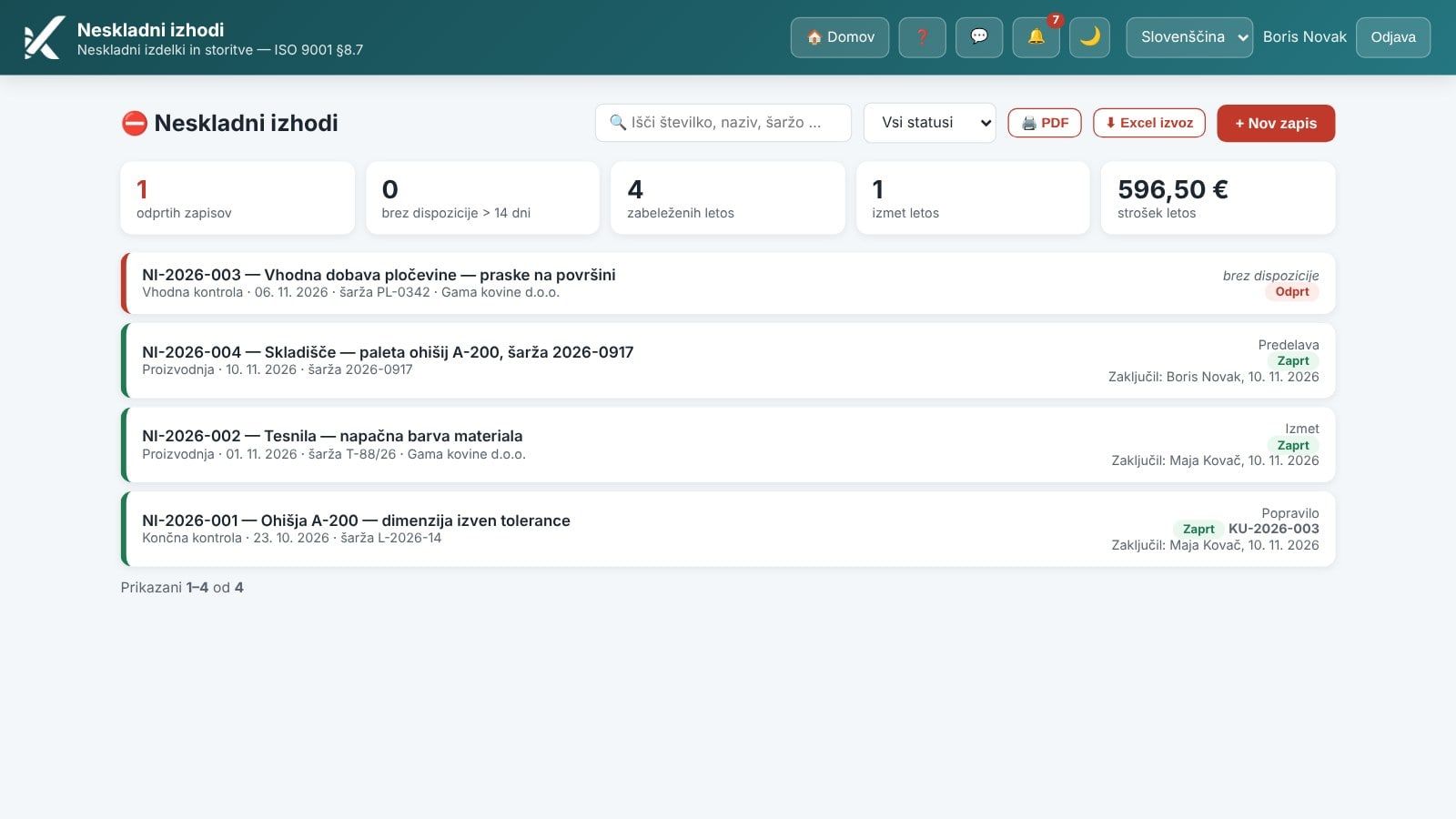
In our previous post we showed how the Nonconforming Outputs module controls nonconforming products with a disposition and a trail. Information security rests on the same foundations as quality: risks in the Risks module, actions in the Actions module and internal audits in the Audits module. How it all fits together is described on the quality management system page.
Frequently asked questions
Does the E-kakovost QMS platform send the incident notification to the competent authority?
No. The platform sends nothing to any authority. It prepares the early warning, the incident notification and the final report as a PDF document, and you submit them yourself through the prescribed channel. You then mark the report as submitted and record when, to whom and how you sent it; a submitted report can no longer be changed.
Does the platform guarantee compliance with ZInfV-1 or ISO/IEC 27001 certification?
No. The platform is a tool for building the system, keeping records and collecting evidence. The readiness percentage shows how many requirements you consider covered and is not a statement of compliance. A certificate is issued by a certification body after an audit, and compliance with the law is supervised by the competent authority. The framework content was prepared from the text of the act and the guidance of URSIV; the texts do not replace legal advice.
What if we already have a quality management system under ISO 9001?
Then a large part of the work is already done. ISO/IEC 27001 has the same structure of clauses 4 to 10 as ISO 9001, so in the Standard implementation module whatever has been done for ISO 9001 also counts for these clauses. Document control, internal audits, management review, corrective actions, the risk register and suppliers stay the same; you add the asset register, the Annex A controls, the statement of applicability and the incident register.
Who is an obliged entity under ZInfV-1?
As a rule, medium-sized and large companies in the sectors listed in the annexes to the Slovenian act. Whether your company is in scope, and whether it is an essential or an important entity, is something you have to assess yourself, with a legal adviser if needed or with the guidance of URSIV, the Slovenian Government Information Security Office. Once you know, you set the entity profile in the Standard implementation module and the platform shows the obligations that apply to you.
What is a statement of applicability?
A statement of applicability (SoA) is the document required by ISO/IEC 27001 in clause 6.1.3 d: for every Annex A control it states whether the control is applicable, why it is included and how far its implementation has progressed, or why it is excluded. In the platform you prepare it from the controls in the Standard implementation module, issue it as an unchangeable version and print it to PDF.
Read next
Transparency: artificial-intelligence tools were used in preparing this article. The content was reviewed and approved by the author.